
ARpiCADE Raspberry Pi JAMMA Adapter


$215.00
Product information "ARpiCADE Raspberry Pi JAMMA Adapter"
ARpiCADE Raspberry Pi JAMMA Adapter
Turn a compatible JAMMA arcade cabinet into a customizable Raspberry Pi-based multigame system. The ARpiCADE Raspberry Pi JAMMA Adapter connects a supported Raspberry Pi to your cabinet's existing controls, audio, power wiring, and display. It supports traditional arcade RGBS monitor configurations as well as selected modern-display setups, with optional connections for additional buttons and multiplayer expansion. HighScoreSaves is the official United States distributor for ARpiCADE.
|
JAMMA Compatible Uses existing cabinet wiring |
Arcade RGBS Video CRT and modern-display options |
|
Expandable Controls Optional six-button and 4-player |
Raspberry Pi System Open, customizable platform |
Before You Order — Compatibility
| Cabinet interface | Compatible standard JAMMA arcade cabinet or properly configured Super Gun |
|---|---|
| Raspberry Pi | Pi 3B or 3B+ for HighScoreSaves Pi 3 software images; Pi 4 or Pi 5 requires an appropriate separately supported ARpiCADE software configuration |
| Original arcade monitor | Compatible low-resolution arcade RGBS monitor with the correct monitor configuration |
| Modern displays | Supported VGA or Raspberry Pi display-output arrangements; select the correct monitor and software configuration |
| Player controls | JAMMA Player 1 and Player 2 directions, start, coin inputs, and up to three action buttons per player |
| Extra buttons | Optional compatible six-button harness required for buttons 4, 5, and 6; cabinet buttons and wiring may also be necessary |
| Audio | Amplified mono through compatible JAMMA wiring or line-level stereo for a suitable external audio system |
| Power | Properly wired, regulated JAMMA cabinet supply; inspect voltage, wiring, and connector orientation before installation |
| SD card and software | Compatible SD card with a supported ARpiCADE software image; optional prepared SD card image available through product selections |
Choose Your ARpiCADE Configuration
Monitor Type
Select the output configuration that matches your cabinet's original arcade RGBS monitor or supported modern-display setup. Your monitor selection must agree with the ARpiCADE software and video connection being used.
Optional SD Card Game-List Image
Choose a prepared SD card image when offered with this product. Available configurations may include vertical upright, horizontal upright, vertical cocktail, and LaserDisc selections. Review the downloadable game lists below and confirm the intended Raspberry Pi model and cabinet arrangement.
Optional Raspberry Pi 3
Select a Raspberry Pi 3 option if you want one supplied with your adapter. The base adapter does not automatically include a Raspberry Pi. HighScoreSaves-provided Pi 3 software images are intended for compatible Raspberry Pi 3B and 3B+ hardware. Other Pi models require their own supported ARpiCADE software image.
What's Included
Base ARpiCADE configuration:
- 1 × full-size ARpiCADE Raspberry Pi JAMMA Adapter
- Selected monitor output configuration
- Prepared SD card image, only when purchased as a selected option
- Raspberry Pi, only when purchased as a selected option
ARpiCADE is a Raspberry Pi-based arcade interface system. It does not use or preserve an original game's arcade PCB in the same way as a HighScoreSaves Free Play and High Score Save Kit or a Darksoft original-hardware multigame kit.
Optional ARpiCADE Accessories & Upgrades
These accessories can add extra buttons, compatible multiplayer connections, Raspberry Pi hardware, or PCB mounting support. Review the selected adapter configuration and your cabinet wiring before ordering. Clicking an accessory image or name opens its separate product page; it does not modify your ARpiCADE adapter selection.
 4-Player Add-On Adapter Adds Player 3 and Player 4 connections to supported full-size ARpiCADE configurations. Additional harnesses may be required. |
 6-Pin Arcade Button Harness Provides extra action-button connections for compatible ARpiCADE headers and cabinet control wiring. |
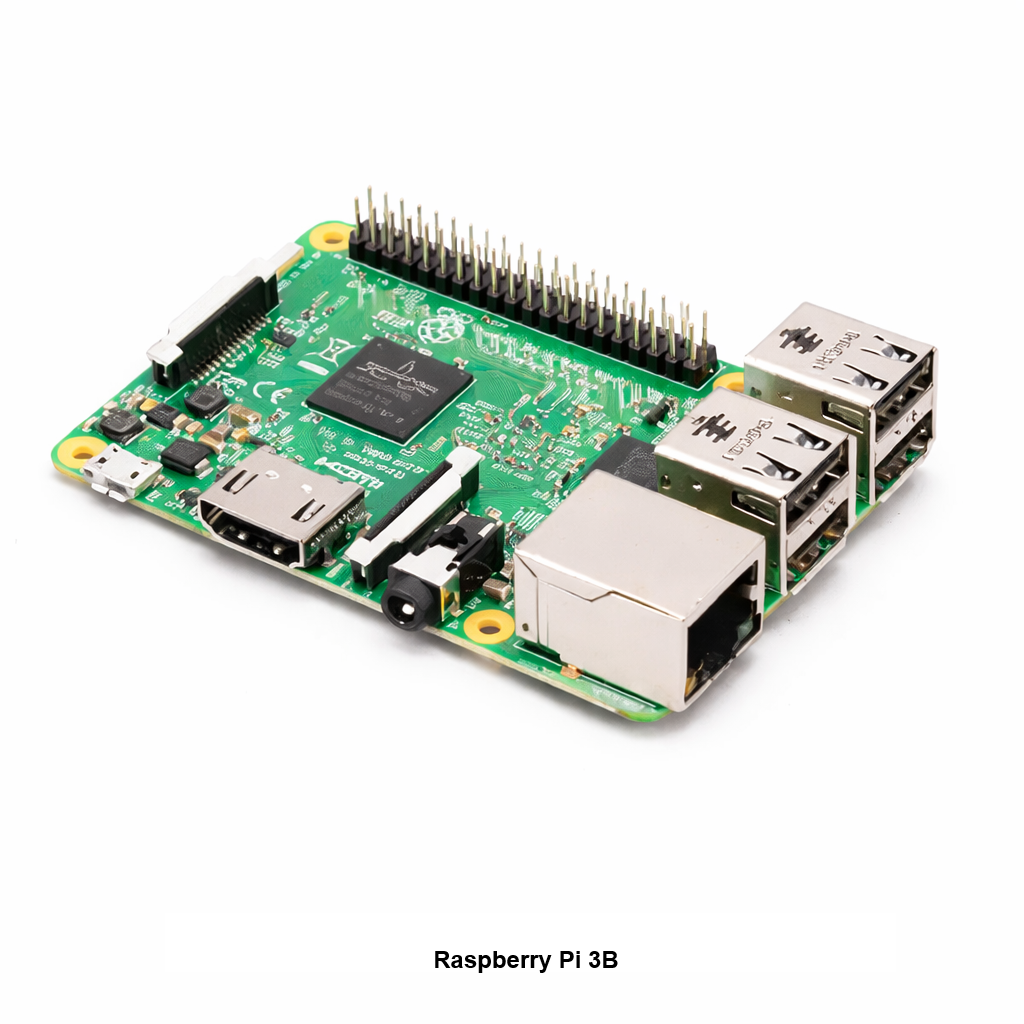 Raspberry Pi Model 3B For compatible Raspberry Pi 3 ARpiCADE software. Check whether your adapter option already includes a Pi. |
 PCB Feet Mounting Kit General-purpose arcade PCB mounting hardware. Verify hole placement, mounting fit, and cabinet clearance. |
The 4-player add-on is for compatible full-size ARpiCADE hardware and is not compatible with the ARpiCADE Mini. For more options, visit ARpiCADE Accessories.
Installation & Helpful Resources
Before installation, check the JAMMA cabinet's power wiring, monitor requirements, controls, and audio connections. Select the correct Raspberry Pi and software image, then connect the adapter with power disconnected. Use the links below to compare compatible systems and review official ARpiCADE software documentation.
|
ARpiCADE Hardware Compatibility & System Comparison
Compare full-size, Mini, and multiplayer ARpiCADE configurations for CRT monitors, modern displays, and player controls. |
|
Official ARpiCADE Documentation & Software Support
Official support resources for compatible software releases, Raspberry Pi configurations, display settings, and troubleshooting. |
Additional Technical Details
Open any section for more detailed setup information about cabinet wiring, displays, controls, Raspberry Pi software, and troubleshooting.
JAMMA Cabinet Installation, Power & Wiring
Standard JAMMA interface: The full-size ARpiCADE adapter connects to a compatible JAMMA arcade cabinet or properly configured Super Gun. It uses the existing harness for supported controls, power connections, audio, and arcade-monitor signals.
1. Inspect the original cabinet: Confirm that the JAMMA edge connector and wiring are in good condition. Check the supply wiring, ground connections, controls, speaker wiring, and monitor configuration before connecting new hardware.
2. Verify the power supply: The adapter uses the cabinet's properly regulated JAMMA power supply. A separate power supply is not normally required in a correctly wired JAMMA cabinet. Do not assume an unknown power supply is suitable without inspection.
3. Confirm connector orientation: Carefully orient the adapter to the compatible JAMMA harness. Never force a connector or use damaged wiring.
4. Install the compatible Raspberry Pi: Use the Raspberry Pi hardware and ARpiCADE software image selected for your installation. HighScoreSaves-provided Pi 3 images are designed for compatible Raspberry Pi 3B and 3B+ units.
5. Prepare the SD card: Use a compatible SD card containing the correct ARpiCADE software image and any supported arcade content for your chosen configuration.
6. Confirm cabinet connections: Verify the intended display, control, and audio arrangements before applying power for the first time.
Important: Always disconnect arcade power before installing, removing, or changing hardware connections. Use an experienced arcade technician if you are uncertain about the cabinet wiring or monitor requirements.
Original Arcade Monitors, VGA & Modern Displays
Original arcade CRT monitors: The full-size ARpiCADE supports compatible traditional arcade RGBS video arrangements. Choose the correct low-resolution arcade-monitor output configuration for the display installed in your cabinet.
VGA display options: Supported higher-resolution configurations may use an appropriate VGA arrangement. The selected output and software must match the display and any required video-conversion hardware.
HDMI or modern displays: Depending on the selected ARpiCADE setup, the Raspberry Pi's display output can be used with a compatible modern LCD or LED monitor. Use the appropriate cable, display settings, and software image for that configuration.
Monitor Type dropdown: Select the monitor configuration that matches the intended installation. Do not select an original arcade CRT configuration for a modern display or vice versa without confirming the necessary hardware and software requirements.
Vertical versus horizontal cabinets: Match the selected game-list image with the monitor's physical orientation. Vertical upright, horizontal upright, and vertical cocktail collections are configured for different cabinet arrangements.
ARpiCADE Mini distinction: The separately available ARpiCADE Mini is intended for suitable high-resolution display setups and does not provide the same low-resolution arcade RGBS output as the full-size adapter.
Critical video warning: An incompatible signal or resolution can damage or improperly operate an original arcade monitor. Confirm compatibility before powering the system.
Player Controls, Six-Button Harness & Audio
Standard JAMMA controls: A compatible JAMMA harness carries Player 1 and Player 2 joystick directions, start-button inputs, coin inputs, and up to three standard action buttons for each player.
Six-button fighting games: Games requiring buttons 4, 5, and 6 need the compatible optional six-button harness connected to the appropriate ARpiCADE header and cabinet control wiring.
Physical cabinet controls: Installing a six-button harness does not automatically add physical buttons. Your cabinet may require additional button holes, arcade pushbuttons, grounding, and control wiring.
Optional 4-player expansion: The compatible full-size ARpiCADE can use the separately available 4-player add-on adapter to provide Player 3 and Player 4 connections. Confirm any required harnesses and software support for your multiplayer configuration.
Mini compatibility: The full-size ARpiCADE 4-player add-on is not compatible with the separately available ARpiCADE Mini.
Amplified mono audio: The standard adapter supports amplified mono audio through correctly wired compatible JAMMA speaker connections.
Line-level stereo audio: The system also supports line-level stereo output for use with a compatible external stereo amplifier or powered audio system.
Audio wiring: Do not connect amplified cabinet speaker outputs directly to line-level inputs. Confirm the cabinet's actual audio wiring and the intended mono or stereo configuration before use.
Raspberry Pi Compatibility, SD Cards & Software Images
Raspberry Pi 3B and 3B+: HighScoreSaves-provided ARpiCADE software images for Raspberry Pi 3 are intended for compatible Pi 3B or 3B+ hardware.
Raspberry Pi 4 and Pi 5: Other Raspberry Pi models may be used only with the appropriate separately supported ARpiCADE software image and compatible hardware configuration. Do not assume a Pi 3 software image will operate correctly on a Pi 4 or Pi 5.
Raspberry Pi inclusion: The base ARpiCADE JAMMA Adapter does not automatically include a Raspberry Pi. Select the available Add a RPi3 option when purchasing a compatible Pi with the adapter.
SD card requirement: A compatible SD card with the appropriate ARpiCADE system image is required. A prepared SD card is supplied only when purchased as part of a selected product option.
Optional image configurations: Available HighScoreSaves image options may include 397-game vertical cocktail, 708-game vertical upright, 1,679-game horizontal upright, 5,025-game horizontal upright arcade and console, and LaserDisc Trilogy upright configurations.
Choose the correct image: Confirm the intended Raspberry Pi model, monitor orientation, display output, control arrangement, and software image before ordering. Not every image is appropriate for every cabinet or Raspberry Pi configuration.
Open and customizable: ARpiCADE is a Raspberry Pi-based software platform. It differs from an original arcade-game PCB upgrade and can be configured with compatible system software and supported game content.
Software documentation: Visit the official ARpiCADE support website for current software releases, hardware compatibility information, and setup guidance. Confirm that you are entitled to use any game software included in your chosen configuration.
Frequently Asked Questions & Technical Support
Does ARpiCADE use original arcade game PCBs?
No. ARpiCADE uses a compatible Raspberry Pi and supported software to interface with the cabinet's existing JAMMA wiring, controls, audio, power, and display.
Is a Raspberry Pi included?
Only if a Raspberry Pi is specifically selected as an available product option. The adapter-only configuration does not automatically include one.
Will it work with my original CRT arcade monitor?
Yes, when the full-size ARpiCADE is configured for a compatible arcade RGBS monitor and your cabinet's wiring and display requirements are supported.
Can I use an LCD or LED display?
Yes, with a supported VGA or Raspberry Pi display-output arrangement, the correct software configuration, and any necessary conversion hardware.
Does the standard adapter support six-button fighting games?
Yes, with the correct optional six-button harness and the necessary additional cabinet buttons and wiring. Standard JAMMA carries the first three action buttons per player.
Can I add Players 3 and 4?
Supported full-size ARpiCADE setups can use the separately available 4-player add-on and required harnesses. The add-on does not work with the ARpiCADE Mini.
What should I check if the system does not start or display correctly?
Verify properly regulated cabinet power, JAMMA wiring and orientation, the Raspberry Pi model, a compatible software image, the SD card, and the correct monitor output configuration. Do not troubleshoot an incompatible CRT video signal by repeatedly powering the system.
Where can I get software and technical assistance?
Visit the official ARpiCADE support website for current documentation, software releases, and community troubleshooting information.
For questions about your HighScoreSaves product configuration, contact sales@highscoresaves.com with your order details, Raspberry Pi model, monitor type, and photographs of the relevant cabinet wiring when appropriate.
ARpiCADE SD Card Image Game Lists
Compare the available game collections before selecting an optional prepared SD card image. The following searchable PDF game lists identify the included titles for the corresponding HighScoreSaves configurations. Each PDF opens in a new browser tab. Software-image availability and supported hardware may vary.
708-Game Vertical Upright Image
A 708-game arcade collection configured for an upright cabinet with a vertical monitor.
View 708-Game List PDF1,679-Game Horizontal Upright Image
A 1,679-game arcade collection configured for an upright cabinet with a horizontal monitor.
View 1,679-Game List PDF5,025-Game Horizontal Upright Image
A larger 5,025-game arcade and console collection for an upright cabinet with a horizontal monitor.
View 5,025-Game List PDFLaserDisc Trilogy Upright Image
An upright LaserDisc collection featuring Dragon's Lair, Dragon's Lair 2, and Space Ace.
View LaserDisc Trilogy List PDF397-Game Vertical Cocktail Image
A 397-game vertical cocktail collection with game titles, release years, and manufacturers.
View 397-Game List PDFShipping Information
Order preparation: Preparation time typically 1–3 business days. Confirm the current availability and any processing information displayed near Add to Cart.
Shipping: Applicable shipping options and charges depend on the destination and selected product configuration. Review the shipping information presented during checkout.
Returns and policies: Review the HighScoreSaves Shipping & Returns Policies for applicable shipping, returns, and order information.
Helpful ARpiCADE Resources
Compare ARpiCADE Raspberry Pi JAMMA Systems
ARpiCADE Accessories & Upgrades
Stay in the Game
Get ARpiCADE updates, arcade hardware tips, new accessories, restock announcements, and occasional subscriber-only offers.
Join the NewsletterHighScoreSaves Newsletter
Login