
Bagman Multigame Free Play and High Score Save Kit




Product information "Bagman Multigame Free Play and High Score Save Kit"

Upgrade Your Original Bagman Arcade PCB
The HighScoreSaves Bagman and Super Bagman Multigame Free Play and High Score Save Kit adds Bagman and Super Bagman to your compatible original Bagman arcade PCB, with Free Play, permanent Top 10 high score saving with initials for each game, adjustable settings, and optional Wi-Fi leaderboard support. Keep your original arcade hardware and gameplay while adding convenient game selection and enhanced features.
|
Free Play Play with or without coins |
High Score Saving Top 10 saved per game with initials! |
|
Attract Sounds Selectable in settings |
Optional Wi-Fi Upload scores to Personal and Global pages! |
Games Included
| Bagman |
| Super Bagman |
Both games permanently save their Top 10 high scores with player initials in separate tables for supported 2-, 3-, 4-, and 5-life settings.
How to Switch Games
While the game is running, press and hold the Player 1 Start (P1) button. This works during attract mode or active gameplay. When the picture freezes on the monitor, release P1. The game-selection menu will appear, allowing you to choose Bagman or Super Bagman.
Bagman Multigame PCB Compatibility at a Glance
| Compatible PCB | Documented compatible original Bagman arcade PCB |
|---|---|
| CPU location | Documented Z80 CPU position |
| CPU socket | Compatible 40-pin socket required |
| Installation | Plug-in when the original Z80 is socketed |
| Graphics installation | Graphics daughter card installs at designated graphics ROM locations |
| ROM requirements | Follow the installation guide for designated graphics and program ROM removal |
| PCB cage clearance | Some cabinets may require temporary cage removal or adjustment |
| Cabinet support | Documented compatible upright and cocktail configurations |
Choose Your Bagman Multigame Kit Version
Standard Kit
Stores supported scores, initials, and settings locally using battery-free EEPROM storage. No internet connection required.
Wi-Fi Enabled Kit
Includes Standard features and can submit qualifying scores to the HighScoreSaves global leaderboard.
What's Included
Base Bagman Multigame Kit:
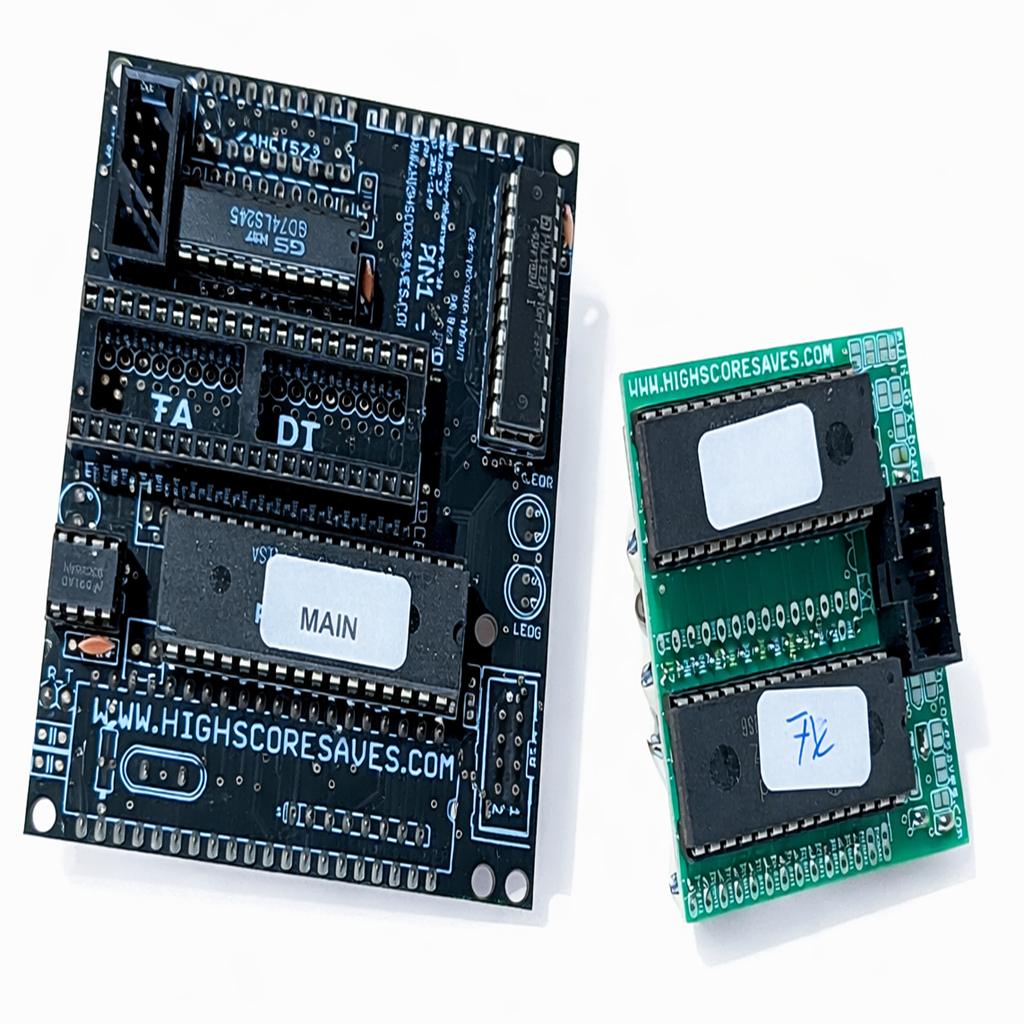
1 × HighScoreSaves Z80 Daughter Card
1 × GRFX Daughter Card
1 × Ribbon Cable
A compatible Z80 processor is required. Transfer your existing compatible Z80 or select a compatible processor option when ordering. A compatible 40-pin CPU socket must be installed on the original PCB.
Installation & Helpful Guides
Check your original Bagman PCB, graphics ROM positions, and daughterboard clearance before fitting your multigame kit.
|
Identify Your Original Arcade PCB
Not sure which board is in your cabinet? |
|
View Bagman and Super Bagman Installation Guide PDF
CPU, graphics daughter card, ROM locations, and installation instructions |
|
Watch Bagman and Super Bagman Settings Menu Video
See the game-selection and settings menus in action |
Additional Details & Resources
Select any section below to see more details.
Advanced Kit Features
| On-Screen Settings Menu | Configure supported game, lives, score, and cabinet settings using the arcade controls. |
|---|---|
| Separate Score Tables | Each game saves its Top 10 scores with initials in separate tables for supported 2-, 3-, 4-, and 5-life settings. |
| Battery-Free Storage | Serial EEPROM stores supported scores, initials, settings, and configuration data without a backup battery. |
| Score Backup & Restore | Back up stored high score data and restore it when needed. |
| Soft Reset & Fast Boot | Restart the selected game without switching off cabinet power and reduce startup delay. |
| Attract-Mode Protection | Rotating supported attract displays help reduce prolonged static-image display. |
| ROM Saver | Supports removal of designated original program ROMs; refer to the installation PDF for locations and procedure. |
Installation & Settings Access
Enter the settings menu: Hold Player 1 Start for approximately 4 seconds while turning on the cabinet.
Installation locations: The kit installs at the documented Z80 CPU position and designated graphics ROM locations on the original Bagman PCB.
ROM removal: Remove only the designated graphics and program ROMs specified in the installation guide.
PCB cage clearance: Some cabinets may require temporary PCB cage removal or adjustment to accommodate the installed daughter cards. Follow the installation PDF for the correct procedure.
Wi-Fi Setup & Global Scores
The Wi-Fi version uses a compatible 2.4 GHz Wi-Fi network. Wi-Fi can be disabled or unavailable without affecting local score saving, initials, game selection, Free Play, settings, or normal gameplay.
Manuals, Schematics & More
Stay in the Game
New arcade kits, restocks, technical tips, and exclusive offers. Delivered to your inbox.
Sign Me Up →HighScoreSaves Newsletter
Login
2 reviews
June 6, 2026 2:51 PM
2x the Fun
This easy to install kit is a great way to double your Bagman fun. Both games are very challenging. I like the free play option and separate high score tables for each game. Fast shipping and great customer service.
September 25, 2025 4:11 AM
Great kit
love this kit! Works great easy to install.