
Hyper Sports | Track and Field | Rearranged Multigame Free Play and High Score Save Kit


Product information "Hyper Sports | Track and Field | Rearranged Multigame Free Play and High Score Save Kit"
Customize Your Hyper Sports | Track and Field | Rearranged Multigame Free Play and High Score Save Kit
Build your kit exactly how you want it. Choose a Wi-Fi Enabled Kit or a Standard Save Kit. You can also add a processor and/or a 40-pin socket—optional but recommended for easy installation.
Learn More About This Kit
Click a button to view details, tips, or the installation guide:



Compatibility
Installs only on a working Hyper Sports PCB. Not compatible with Track & Field PCBs.
The Hyper Sports PCB is unique in its sprite and graphics sections compared to Track & Field. This multigame kit lets you play Track & Field, Hyper Sports, and the new Hyper Sports Rearranged on a Hyper Sports PCB.
Hyper Sports Rearranged mixes events and adds fresh twists to both games (with potential new levels).
Requirements & Install Notes
Please review the installation guide before purchase/installation. Soldering is required.
- Upper PCB: Z80 sound CPU socket (40-pin) at AB18; PROM socket 16-pin narrow at C3.
- Lower PCB: PROM sockets 16-pin narrow at A9 and J12.
- Set jumpers to 128 (not 64) at D10/D11 and F18/F19.
Features
- Save your scores forever – Serial EEPROM (not NVRAM or batteries).
- High Score Save – Top 10 (T&F), Top 13 (Hyper Sports), Top 23 (Rearranged).
- Separate Score Tables – Each game has its own tables.
- ROM Revisions – Latest official builds.
- Attract Sounds – 25%, 50%, or 100% rotation.
- Attract Jingles – Jingles every 4th rotation; extras in Rearranged.
- Freeplay – No coins required.
- Coin Up – Still works.
- Attract Mode – Helps prevent screen burn.
- Controls – Supports players 1–4.
- On-screen DIP settings – No cabinet access needed.
- ROM Saver – Remove original program ROMs.
- Cabinet Support – Upright and Cocktail (4-player).
- Backup & Restore – Save/export high scores.
- Reset Button – Restart without powering down.
Additional Features
- Choose your game – Boot to HS, T&F, or Rearranged.
- Stealth Mode – Boot to last played / auto-select.
- Practice Levels – Start at any event.
- Bonus Man Options – Track & Field only.
- Copyright – Konami/Centuri or website branding.
- Menu Lock – Prevent unauthorized settings changes.
- Processor – Uses a 6809E processor.
Important
- Ensure all required sockets (Z80 & PROMs) are installed.
- This kit requires soldering — it is not plug-and-play.
- Read the Hyper Sports Rearranged Installation Guide (PDF) before beginning installation.
Game List
- Track & Field
- Hyper Sports
- Hyper Sports Rearranged
FAQ
Which games are included with this kit?
The kit includes Track & Field, Hyper Sports, and Hyper Sports Rearranged.
Can I install this kit on a Track & Field PCB?
No — installs only on Hyper Sports PCBs.
Is soldering required?
Yes. Sockets and jumper settings are required.
How many high scores are saved?
Track & Field: Top 10
Hyper Sports: Top 13
Rearranged: Top 23
Includes world record tracking.
Does Freeplay disable coin use?
No — Coin Up still works.
Where can I download the installation guide?


Login
3 reviews
January 9, 2026 10:59 PM
Gold Medal!
This is a fantastic product and a no-brainer for anyone with a Hyper Sports PCB. Installation was fairly straightforward with my modest soldering skills. Ran into one issue with the kit that required some troubleshooting and a fix from Joe, but he was great to deal with and got me sorted out quickly.
Now if only I could figure out how run as fast as my 11 year old daughter! No pencils allowed....
September 23, 2025 10:53 PM
On you marks...get set...GO!
Having hypersports and track and field in one game is a blast. Joe was cruel to put in a 400m race...very challenging! This game is a favorite in my family!
September 23, 2025 3:28 PM
Hyper Sports Multigame
This is one of the most fun kits you can add to your arcade. Playing Rearranged with family and friends is so cool. Trying to make through the 400m without getting too tired is a challenge. The kit has the usual options of separate high score save and free play plus a menu to select individual events so you can practice levels that you need to work on. This kit is a blast.
Level up with these!

Hyper Sports | Track and Field | Rearranged Multigame Instruction Magnet This magnet applies and removes easily. It adheres to any ferrous metal (steel control panels, coin doors, etc.). For non-metal surfaces, use double-sided mounting tape (not included). Specifications Size: 3″ (L) × 2″ (W) Finish: Soft-laminated top Back: Strong magnetic backing
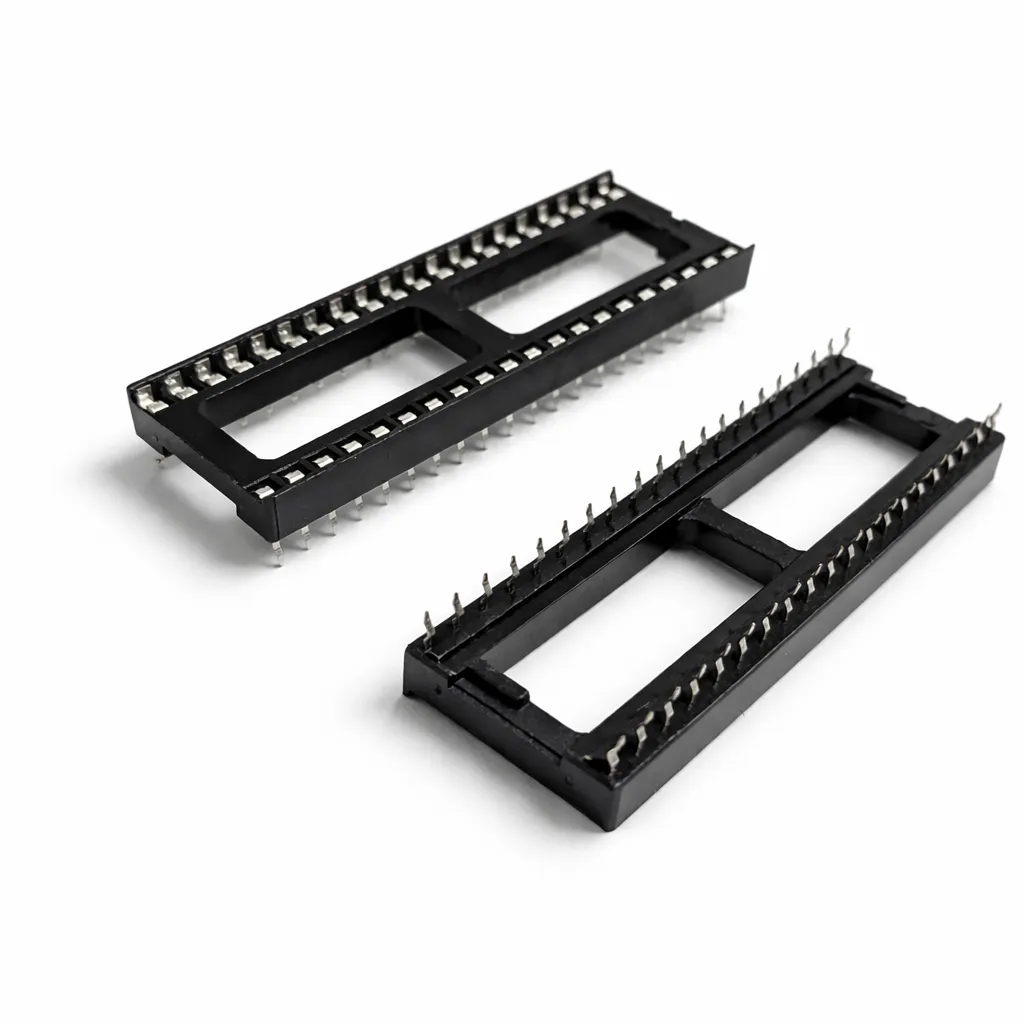
40-Pin Socket Specifications This 40-pin DIP socket is designed for reliable installation of integrated circuits and arcade daughter boards that use a standard 40-pin layout. Using a socket allows the chip or module to be easily removed or replaced without soldering directly to the PCB, helping protect the board during upgrades, repairs, or troubleshooting. Pin Pitch: 2.54 mm (0.100″) standard DIP spacing Total Pins: 40 pins arranged in two rows (2×20) Mounting Type: Through-hole (THT) for secure soldered installation Compatibility: Designed for standard 40-pin DIP integrated circuits and modules Installation Benefit: Allows ICs to be inserted or removed without repeated soldering Use Case: Ideal for arcade PCB upgrades, ROM installations, and repair work The standard 2.54 mm (0.100″) pin spacing matches the layout used on most classic arcade PCBs and DIP integrated circuits. Once soldered to the board, the socket provides a stable connection while allowing the chip to be safely inserted and removed when needed.

6809E 8-Bit Microprocessor (40-Pin CPU) The 6809E is a powerful 8-bit microprocessor commonly used in classic arcade PCBs during the early and mid-1980s. This processor served as the main CPU for many arcade boards, executing game code, handling player inputs, and coordinating communication between memory, sound hardware, and video circuitry. Known for its advanced architecture compared to earlier processors, the 6809E provided improved instruction sets and efficient memory addressing, making it a popular choice for more complex arcade games. A properly functioning CPU is essential for reliable board operation, making the 6809E a common replacement component during arcade PCB repair and restoration. Key Features Motorola 6809E 8-bit microprocessor Standard 40-pin DIP (Dual In-line Package) Used as the main CPU in many classic arcade boards Handles game logic, timing, and hardware communication Ideal for arcade PCB repair and restoration work Used In Arcade Games Such As Circus Charlie Juno First Track & Field Hyper Sports Star Wars Qix …and many other classic arcade titles Some arcade boards use the 6809E processor in conjunction with other supporting chips or adapters. In certain Konami systems, the 6809E can be used with a 42-pin Konami-1 adapter, which is included with some HighScoreSaves kits. Installation Notes Installs into a standard 40-pin DIP socket on compatible arcade PCBs Ensure proper notch orientation when installing the CPU Recommended for technicians performing arcade board troubleshooting or restoration *Can be used with a 42-pin Konami-1 adapter (included with some HighScoreSaves kits). *Manufacturer brands may vary.
Spark your interest -

Donkey Kong Rearranged Multigame Free Play and High Score Save Kit This is the newest Donkey Kong kit on the scene: high-score saves, Free Play, and attract sounds—designed for the 21st century. This is NOT Double Donkey Kong. Install on a Donkey Kong or Donkey Kong Jr. board set (selected in the drop-downs) and play Donkey Kong, Donkey Kong Jr., Donkey Kong 3, D2K: Jumpman Returns plus the Rearranged Edition and unlockable editions on your PCB. Adding the Remix Collection gives you four more game versions. No special wiring or switches required. Enter the Modern Menu by holding P1 for 4 seconds to access the Game Select Menu instantly. Customize Your Donkey Kong Rearranged Multigame Free Play and High Score Save Kit Build your kit exactly how you want it. Choose a Wi-Fi Enabled Kit or a Standard Save Kit. You can also add a processor and/or a 40-pin socket—optional but recommended for easy installation. Learn More About This Kit Click a button to view details, tips, or the installation guide. In the drop-down selections above, choose which PCB to install the kit on (kits differ by selection), add the 4-game Remix Collection, and enable Wi-Fi to upload your scores to your personal webpage. Installation Guides - 3DK Install Guide (DK PCB) 3DK Install Guide (on a Donkey Kong PCB) 3DKJr Install Guide (DKJr PCB) 3DKJr Install Guide (on a Donkey Kong Jr. PCB) Game List Donkey Kong Pauline Donkey Kong Donkey Kong Junior Donkey Kong 3 D2K: Jumpman Returns Pauline D2K: Jumpman Returns Donkey Kong (Japan ROMs) Donkey Kong Jr. (Japan ROMs) Practice Levels Rearranged Edition – an intertwined game-level lineup Optional Remix Collection Donkey Kong Remix Donkey Kong Jr. Remix Donkey Kong Christmas Remix Donkey Kong Spooky Remix Unlockable Levels Drunken Master Edition – 2× points & reversed controls Black Hammer Edition - When the lights go out... Wild Barrel Edition - Every barrel thrown is WILD Miner 2049er Edition - Play a vision on the old classic! Builders Edition - The screen builds as you progress FHMC Edition – Faster, Harder, More Challenging Rearranged lineup Personal Edition – Build your own Rearranged version Main Features No soldering required – plug in and go. Modern Menu – sleek game select system. High Score Save – Top 5 per game. Extended scoring – supports 1M+ across all games. Free Play + Coin Up Attract sounds – 25%, 50%, 100%. DIP settings in menu Screen saver ROM Saver Practice Mode Sound Expansion Module Kill-screen toggle Important Socketed Z80 required This kit comes with a z80 installed on main daughter card DK or DKJr boards only (no DK3 support) 2-board stack only (no 4-board) Read the correct installation guide based on your PCB Just the FAQ's Do I need to send in my PCB? No—install yourself in ~15 minutes. Does the 3DK Multigame kit sound correct? Yes—multiple audio profiles. Does this run on DK and DKJr PCBs? Yes—select the correct board in the product options. Will it work on a 4-board DK stack? No—2-board stack only. Where can I download the Installation Guide? 3DK Install Guide (DK) 3DKJr Install Guide (DKJr) Resources 3DK Install Guide (Donkey Kong) — PDF 3DKJr Install Guide (Donkey Kong Jr.) — PDF HighScoreSaves eBay Store HighScoreSaves YouTube Channel HighScoreSaves Facebook Page

Customize Your Tempest Multigame Free Play and High Score Save Kit Build your kit exactly how you want it. Choose a Wi-Fi Enabled Kit or a Standard Save Kit. You can also add a processor and/or a 40-pin socket—optional but recommended for easy installation. Learn More About This Kit Click a button to view details, tips, or the installation guide. Main Features Easy install: No soldering, board modifications, or special wiring. Just plug in and play. Save your scores forever: Uses reliable serial EEPROM (not failure-prone NVRAM or batteries). High Score Save: Stores the Top 8 scores. Attract Sounds: Set to 25%, 50%, or 100% of the attract rotation. Freeplay: No more coins or opening the coin door. Coin Up: Supports quarters or tokens if desired. Attract Mode: Reduces screen burn by avoiding static screens. Copyright Message: Choose original manufacturer or Highscoresaves. On-screen DIP settings: Change dips via menu; no cabinet pull-out required. ROM Saver: Original program ROMs can be removed (program is on the save kit). Cabinet support: Works in Upright and Cocktail cabinets. Additional Features Backup and Restore: Save and restore high scores (perfect before/after parties). Reset Button: Restart without powering off (enable in menu). Separate score tables: Different HSS tables for 2, 3, 4, or 5 lives. Fast boot: No long initialization wait. Stealth Mode: Boots straight into the game. Choose Your Level: Start up to level 81. Extended level-select time: 60 seconds (instead of 10). Includes the latest ROM revision. Game List Tempest Tempest Tubes Important Installation Notes Socketed 6502 required: If your 6502 isn’t socketed, install a 40-pin socket for the kit to work. Read the Tempest Multigame Installation Guide (PDF) before setup. FAQ Do I need to solder anything?No. The kit is plug-and-play if your 6502 is socketed. Otherwise, install a 40-pin socket first. What’s the difference between the Wi-Fi and Standard kits?The Wi-Fi kit uploads scores online and syncs to your web page. The Standard kit saves scores locally only. Can I upgrade to Wi-Fi later?No. Wi-Fi hardware must be included at purchase—there’s no upgrade path later. Will it work in my cabinet?Yes. The kit supports both Upright and Cocktail Tempest cabinets. How many scores does it save?It saves the Top 8 scores with initials. Can I back up and restore scores?Yes. Backup & Restore lets you save before events and restore afterward. Does it support Freeplay and Coin Up?Yes. You can use Freeplay or keep coins/tokens enabled. What’s Stealth Mode?Stealth Mode boots straight to the game, bypassing setup screens. Can I select starting levels?Yes. Level Select lets you start up to level 81, with extended 60-second selection time. Where do I get the installation guide?Download the Tempest Multigame Installation Guide (PDF) Resources Tempest Multigame — Installation Guide (PDF) HighScoreSaves YouTube Channel — Installation Tips HighScoreSaves Facebook Page HighScoreSaves eBay Store

Customize Your Gyruss | Time Pilot Multigame Free Play and High Score Save Kit Build your kit exactly how you want it. Choose a Wi-Fi Enabled Kit or a Standard Save Kit. You can also add a processor and/or a 40-pin socket—optional but recommended for easy installation. Learn More About This Kit Click a button to view details, tips, or the installation guide: This Gyruss Multigame High Score Save and Free Play Kit allows you to play Gyruss, Time Pilot, and Pooyan on your original Gyruss PCB without a switcher! Most Gyruss PCBs will require additional sockets: 3× 16-pin PROMs (GYA/GYB/GYC), 1–2× 16-pin LS377s (depending on risers), and a 40-pin socket for the CPU. Install Info – No board modifications or special wiring required (though socket installation is required on most Gyruss PCBs). Main Features Easy install: Plug in and go (no modifications or wiring). Save your scores forever: Uses serial EEPROM (not NVRAM or batteries). High Score Save: Saves the Top 5 scores with initials. Attract Sounds: 25%, 50%, or 100% sound cycles. Freeplay: No more coins or opening the coin door. Coin Up: Still supports coins if desired. Attract Mode: Reduces screen burn. On-screen DIP settings: Menu-driven DIP options. ROM Saver: Original program ROMs removable. Cabinet Support: Works in Upright or Cocktail cabinets. Copyright: Choose Centuri or HighScoreSaves. Extended Scoring: Up to 9,999,990 points. Additional Features Backup & Restore: Save and restore high scores. Separate Score Tables: 3, 5, or 6 lives. Reset Button: Restart without powering down. Self-test: Via menu or DIP switches off. God Mode: Unlimited lives (scores not saved). Stealth Mode Multigame: Choose Gyruss, Time Pilot, or Pooyan at boot. Important Installation Notes Z80 must be socketed: Install a 40-pin socket if needed. Read the Gyruss | Time Pilot Multigame Installation Guide (PDF) before setup. Game List Gyruss Time Pilot Pooyan FAQ Which games are included?The kit supports Gyruss, Time Pilot, and Pooyan. Does this kit require soldering?Most Gyruss PCBs require additional sockets (PROMs, LS377s, CPU). How many high scores are saved?Permanently saves the Top 5 scores for each game. Will Freeplay disable coins?No. Coin Up still works even in Freeplay mode. Can I switch between games?Yes — via Stealth Mode multigame menu. Where is the install guide? Gyruss | Time Pilot Multigame Installation Guide (PDF) Resources Gyruss | Time Pilot Multigame — Installation Guide (PDF) HighScoreSaves YouTube Channel — Installation Tips HighScoreSaves Facebook Page HighScoreSaves eBay Store

Customize Your Scramble Multigame Free Play and High Score Save Kit Build your kit exactly how you want it. Choose a Wi-Fi Enabled Kit or a Standard Save Kit. You can also add a processor and/or a 40-pin socket—optional but recommended for easy installation. Learn More About This Kit Click a button to view details, tips, or the installation guide. Features Easy install – No soldering, board modifications, or special wiring. Plug in and go! Save your scores forever – Uses a serial EPROM, not failure-prone NVRAM or batteries. High Score Save – Saves the Top 10 scores with initials. Choose your game – Scramble, Super Cobra, Anteater, Frogger, Amidar, Armored Car, Turtles, and The End. Attract Sounds – Adjustable at 25%, 50%, or 100%. Freeplay – No more coins or opening the coin door. Coin Up – Still supports coins if desired. Attract Mode – Minimize screen burn with dynamic screens. Change DIP settings – Menu-driven; no need to open the cabinet. ROM Saver – Optionally remove original program ROMs to save power. Cabinet Support – Works in Upright cabinets. Additional Features Backup and Restore – Save and restore high scores (perfect before/after parties). Separate score tables – Different tables for 2, 3, or 4 lives settings. Reset Button – Restart a game without powering off (requires enabling in menu). Self-Test – Accessible via the main menu or by setting all PCB DIP switches OFF. Continue? – Enable or disable at will. God Mode – Unlimited lives (scores won’t save). Stealth Mode – Make the kit look stock at boot up. Fixed Inputs – Upright-only; Player 1 inputs used (no rewiring needed). Important Ensure your Z80 is socketed. If not, install a 40-pin socket for kit compatibility. Read the Scramble Multigame Installation Guide (PDF) before installing. Scramble – Extended scoring up to 9,999,990 points. Choose difficulty between Konami and Stern (Stern ROMs drain fuel faster). Frogger – Extended scoring up to 9,999,990 points; music bug fixed with improved tune. Known Differences – The End: bullets are dots; Frogger: blue street; Anteater: blue tunnels. Game List Scramble Super Cobra Anteater Frogger Amidar Armored Car Turtles The End FAQ Do I need to solder anything?No, this kit is plug-and-play. No soldering or board modifications required. Does it save scores permanently?Yes, high scores are stored in serial EPROM and don’t require batteries. How many scores are saved?The kit saves the Top 10 scores with initials for each game. Can I switch between games?Yes — select from Scramble, Super Cobra, Anteater, Frogger, Amidar, Armored Car, Turtles, or The End. Does it support attract sounds?Yes, adjustable at 25%, 50%, or 100%. Can I enable Freeplay?Yes — Freeplay is supported, but Coin Up can still be used. Does it support backup and restore?Yes, scores can be backed up and restored at any time. What special modes are included?God Mode, Stealth Mode, Continue option, and more. What are the known differences?The End: dot bullets; Frogger: blue street; Anteater: blue tunnels. Where can I download the installation guide? Scramble Multigame Installation Guide (PDF) Resources Scramble Multigame Free Play and High Score Save Kit — Installation Guide (PDF) HighScoreSaves YouTube Channel — Installation Tips HighScoreSaves Facebook Page HighScoreSaves eBay Store

Customize Your Exidy 440 Multigame Free Play and High Score Save Kit Build your kit exactly how you want it. Choose a Wi-Fi Enabled Kit or a Standard Save Kit. You can also add a processor and/or a 40-pin socket—optional but recommended for easy installation. Learn More About This Kit Click a button to view details, tips, or the installation guide. About this kit: Play the Exidy 440 classics on your original Exidy 440 PCB—no switcher required. Designed exclusively for original Exidy 440 hardware. Main Features Easy install: No soldering, board mods, or wiring—plug in and go. Permanent high-score saving: EEPROM (not NVRAM or batteries). High-score modes: Save All, Top 3, first score only, or disable. Per-game score tables: Every title has its own table. Attract sounds: 25%, 50%, or 100% rotation. Freeplay & Coin-Up: Supports both modes. Attract mode: Rotates demos to reduce screen burn. Menu-driven DIP: All settings on-screen. ROM Saver: Original ROMs must be removed. Backup & Restore: Save/restore high scores. Difficulty: Normal, Hard, Harder, Hardest. Flexible menus: Text list or marquee (image) menu. Gun-select option: Shoot once to select, again to start. Stealth Mode: Boot directly into a chosen game. Admin lockout: Restrict settings submenu. Additional Options Startup sound: Choose from 32 samples. God Mode: Practice without saving scores. Hide HSS logo: Optional. Diagnostics: Built-in tools. Games List Crossbow Cheyenne Chiller Catch 22 Clay Pigeon Combat Crackshot Hit n Miss WhoDunnit Showdown Important Installation Notes Original Exidy 440 PCB required: This kit is for genuine Exidy 440 hardware. ROM Saver: Remove original program ROMs (as shown in guide). Read the Exidy 440 Installation Guide (PDF) before setup. FAQ Which games are included? Includes Crossbow, Cheyenne, Chiller, Catch 22, Clay Pigeon, Combat, Crackshot, Hit n Miss, WhoDunnit, and Showdown. Do I need an original Exidy 440 PCB? Yes — designed exclusively for original Exidy 440 hardware. How do high-score modes work? Choose: All, Top 3, first score only, or disabled — all per-game. Can I select games with the gun? Yes — shoot once to select (title blinks), shoot again to start. Freeplay supported? Yes — Freeplay or Coin-Up. What is Stealth Mode? Boots directly into last-played or selected game. What does ROM Saver mean? Remove original program ROMs; program runs on kit. Does God Mode save scores? No — God Mode disables score saving. Where can I download the guide? Exidy 440 Installation Guide (PDF) Resources Exidy 440 Multigame — Installation Guide (PDF) HighScoreSaves YouTube Channel — Installation Tips HighScoreSaves Facebook Page HighScoreSaves eBay Store