
Karate Champ Player vs Player Free Play and High Score Save Kit


$109.50
Available, delivery time: 2-5 days
Product information "Karate Champ Player vs Player Free Play and High Score Save Kit"
Customize Your Karate Champ Player vs Player Free Play and High Score Save Kit
Build your kit exactly how you want it. Choose a Wi-Fi Enabled Kit or a Standard Save Kit. You can also add a processor and/or a 40-pin socket — optional but recommended for easy installation.
Learn More About This Kit
Click a button to view details, tips, or the installation guide.



Features
- Easy install — No soldering, board modifications, or special wiring. Plug in and go!
- Save your scores forever — Uses reliable serial EEPROM (not failure-prone NVRAM or batteries).
- High Score Save — Saves all scores shown on screen.
- Initial entry — Enter and save your initials.
- Copyright options — Switch between manufacturer logo or HighScoreSaves logo on attract screen.
- Freeplay — No more coins or opening the coin door.
- Coin Up — Still supports coins if desired.
- Attract Mode — Minimizes screen burn; no static screens.
- Menu-driven DIP settings — Change DIP switches without opening your game.
- ROM Saver — Optionally remove original program ROMs to save power.
- Cabinet support — Works in Upright or Cocktail cabinets.
Additional Features
- Backup & Restore — Back up high scores and restore later.
- Separate score tables — Different high score saving for selected lives (2, 3, or 4).
- Stealth Mode — Access menu by pressing Player 1 while powering on.
Important
- Ensure your Z80 is socketed. If not, install a 40-pin socket for the kit to work.
- ROM saver locations — Program ROMs that may be removed: D6, D7, D8, D10, D11, D13.
- Read the Karate Champ Free Play and High Score Save Kit Installation Guide / Manual (PDF) before setup.
Version Selection (DIP1)
- Set DIP1 = ON for Version 1.
- Set DIP1 = OFF for Version 2.
Just the FAQ's
Does this kit require soldering?
No soldering is required if your Z80 is socketed.
Which scores are saved?
All scores shown on-screen are saved permanently.
Will Free Play disable coin operation?
No — Freeplay and Coin Up can both be used.
What does ROM Saver do?
Allows removing ROMs D6, D7, D8, D10, D11, D13 to reduce heat and power usage.
Where is the installation guide?
Can I enter initials?
Yes — initials are fully supported.


Login
Level up with these!

Z80 8-Bit Microprocessor (40-Pin CPU) The Z80 is a classic 8-bit microprocessor widely used in arcade machines from the late 1970s through the 1980s. This processor served as the main CPU in many arcade PCBs, executing game code, processing player inputs, and coordinating communication with memory, sound hardware, and video circuitry. The Z80 became one of the most popular processors in arcade hardware due to its reliability and expanded instruction set compared to earlier CPUs. Because of its widespread use, the Z80 is commonly found in a variety of classic arcade games and remains an essential component when repairing or restoring vintage arcade boards. This processor uses a standard 40-pin DIP (Dual In-line Package) and installs directly into a compatible socket on the arcade PCB. Replacing a faulty CPU can often resolve boot failures, lockups, or other operational issues in aging arcade hardware. Key Features Z80 8-bit microprocessor Standard 40-pin DIP package Common CPU used in many classic arcade PCBs Handles core game logic, timing, and system control Ideal for arcade PCB troubleshooting, repair, and restoration Used In Arcade Games Such As Donkey Kong Galaga Donkey Kong Jr. Frogger Galaxian Dig Dug Xevious …and many other classic arcade titles Installation Notes Installs into a standard 40-pin DIP socket on compatible arcade PCBs Ensure correct notch orientation when installing the CPU Recommended for technicians performing arcade board repair or restoration *Manufacturer brands or markings may vary.
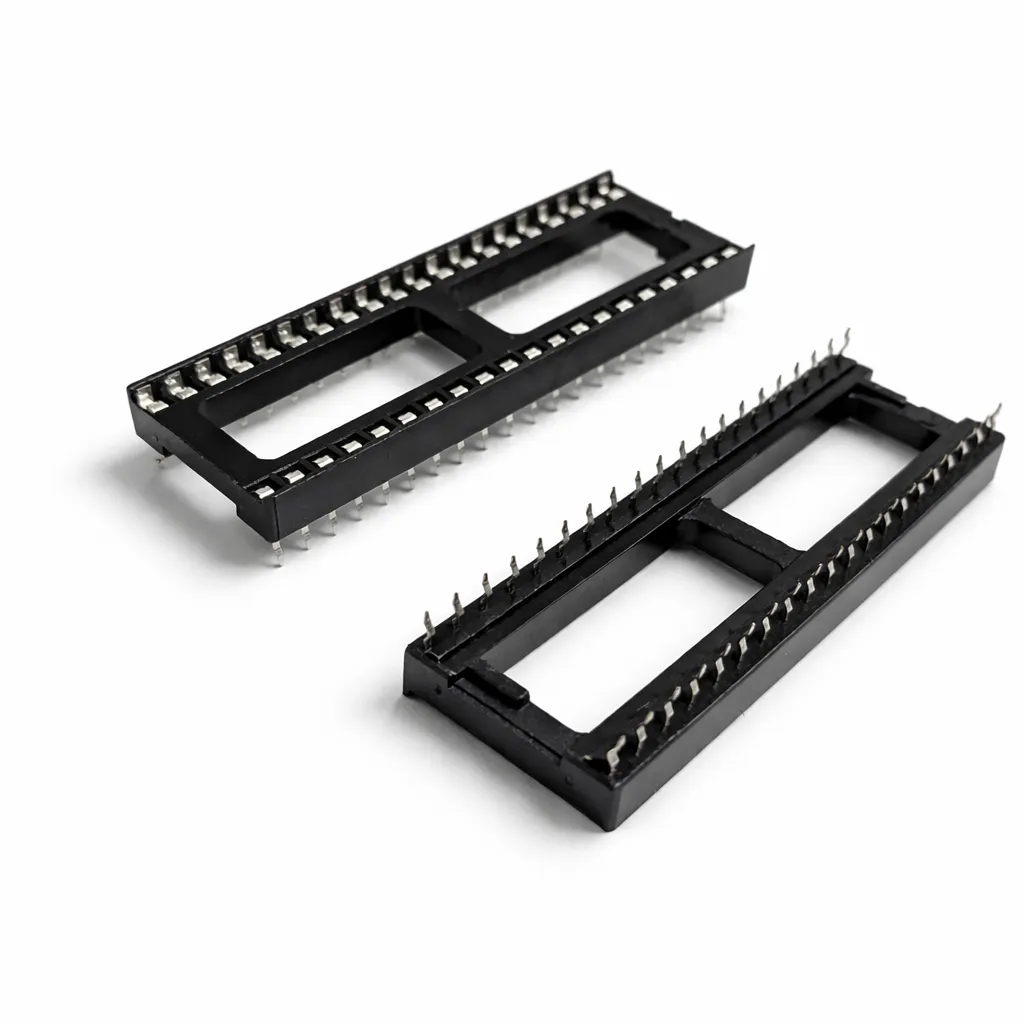
40-Pin Socket Specifications This 40-pin DIP socket is designed for reliable installation of integrated circuits and arcade daughter boards that use a standard 40-pin layout. Using a socket allows the chip or module to be easily removed or replaced without soldering directly to the PCB, helping protect the board during upgrades, repairs, or troubleshooting. Pin Pitch: 2.54 mm (0.100″) standard DIP spacing Total Pins: 40 pins arranged in two rows (2×20) Mounting Type: Through-hole (THT) for secure soldered installation Compatibility: Designed for standard 40-pin DIP integrated circuits and modules Installation Benefit: Allows ICs to be inserted or removed without repeated soldering Use Case: Ideal for arcade PCB upgrades, ROM installations, and repair work The standard 2.54 mm (0.100″) pin spacing matches the layout used on most classic arcade PCBs and DIP integrated circuits. Once soldered to the board, the socket provides a stable connection while allowing the chip to be safely inserted and removed when needed.
Spark your interest -

Customize Your Yie Ar Kung Fu Free Play and High Score Save Kit Build your kit exactly how you want it. Choose a Wi-Fi Enabled Kit or a Standard Save Kit. You can also add a processor and/or a 40-pin socket—optional but recommended for easy installation. Learn More About This Kit Click a button to view details, tips, or the installation guide. Main Features Easy install: No soldering, board modifications, or special wiring. Plug in and go. Save your scores forever: Uses serial EEPROM (not failure-prone NVRAM or batteries). High Score Save: Stores the Top 10 scores. Initials option: Choose 10-character original or 3-character initials entry. Attract Sounds: Plays attract sounds at 100% of the attract rotation. Freeplay: No more coins or opening the coin door. Coin Up: Accept coins/tokens if desired. Attract Mode: Designed to avoid static images and reduce screen burn. On-screen DIP settings: Menu-driven DIP configuration. ROM Saver: Remove original program ROMs if you prefer. Cabinet compatibility: Works in both Upright and Cocktail cabinets. Additional Features Backup & Restore: Save and restore high scores. Flip Screen: Rotate the display 180° from the menu. Important Installation Notes 6809E processor required: This kit runs on a 6809E CPU. Ensure your CPU is socketed; if not, install a 40-pin socket. Read the Yie Ar Kung Fu Installation Guide (PDF) before installation. FAQ Is installation truly plug-and-play? Yes. Just ensure your 6809E processor is socketed. How many scores are saved? Top 10 scores saved, with selectable 3- or 10-character initials. What’s the difference between Wi-Fi and Standard kits? Wi-Fi uploads scores online; Standard saves locally. Can I flip the screen? Yes—rotate the screen 180° in the menu. Where can I download the Installation Guide? Yie Ar Kung Fu Installation Guide (PDF) Will this work in my cabinet? Yes. Supports Upright and Cocktail cabinets. Does Freeplay disable coin inputs? No. Freeplay works alongside coins if desired. Can I back up or restore high scores? Yes—Backup/Restore is included. Do I need to remove the original program ROMs? No. The kit works with or without the original ROMs. How do I choose 3-character vs 10-character initials? Set your preference in the on-screen menu. Resources Yie Ar Kung Fu — Installation Guide (PDF) HighScoreSaves YouTube Channel — Installation Tips HighScoreSaves Facebook Page HighScoreSaves eBay Store
Customize Your Yie Ar Kung Fu Free Play and High Score Save Kit Build your kit exactly how you want it. Choose a Wi-Fi Enabled Kit or a Standard Save Kit. You can also add a processor and/or a 40-pin socket—optional but recommended for easy installation. Learn More About This Kit Click a button to view details, tips, or the installation guide. Main Features Easy install: No soldering, board modifications, or special wiring. Plug in and go. Save your scores forever: Uses serial EEPROM (not failure-prone NVRAM or batteries). High Score Save: Stores the Top 10 scores. Initials option: Choose 10-character original or 3-character initials entry. Attract Sounds: Plays attract sounds at 100% of the attract rotation. Freeplay: No more coins or opening the coin door. Coin Up: Accept coins/tokens if desired. Attract Mode: Designed to avoid static images and reduce screen burn. On-screen DIP settings: Menu-driven DIP configuration. ROM Saver: Remove original program ROMs if you prefer. Cabinet compatibility: Works in both Upright and Cocktail cabinets. Additional Features Backup & Restore: Save and restore high scores. Flip Screen: Rotate the display 180° from the menu. Important Installation Notes 6809E processor required: This kit runs on a 6809E CPU. Ensure your CPU is socketed; if not, install a 40-pin socket. Read the Yie Ar Kung Fu Installation Guide (PDF) before installation. FAQ Is installation truly plug-and-play? Yes. Just ensure your 6809E processor is socketed. How many scores are saved? Top 10 scores saved, with selectable 3- or 10-character initials. What’s the difference between Wi-Fi and Standard kits? Wi-Fi uploads scores online; Standard saves locally. Can I flip the screen? Yes—rotate the screen 180° in the menu. Where can I download the Installation Guide? Yie Ar Kung Fu Installation Guide (PDF) Will this work in my cabinet? Yes. Supports Upright and Cocktail cabinets. Does Freeplay disable coin inputs? No. Freeplay works alongside coins if desired. Can I back up or restore high scores? Yes—Backup/Restore is included. Do I need to remove the original program ROMs? No. The kit works with or without the original ROMs. How do I choose 3-character vs 10-character initials? Set your preference in the on-screen menu. Resources Yie Ar Kung Fu — Installation Guide (PDF) HighScoreSaves YouTube Channel — Installation Tips HighScoreSaves Facebook Page HighScoreSaves eBay Store

Customize Your Kangaroo Free Play and High Score Save Kit Build your kit exactly how you want it. Choose a Wi-Fi Enabled Kit or a Standard Save Kit. You can also add a processor and/or a 40-pin socket — optional but recommended for easy installation. Learn More About This Kit Click a button to view details, tips, or the installation guide. Features Easy install — No soldering, board modifications, or special wiring. Save your scores forever — Reliable serial EEPROM (not NVRAM or batteries). High Score Save — Stores the Top 10 scores with initials. Copyright options — Switch between manufacturer logo and HighScoreSaves logo. Freeplay — Play with no coins needed. Coin Up — Still supports coin operation. Attract Mode — Prevents CRT burn-in via screen cycling. Menu-driven DIP settings — Change DIP settings on-screen. ROM Saver — Remove original program ROMs to reduce heat and power. Cabinet support — Works in Upright and Cocktail cabinets. Additional Features Backup & Restore — Save and reload high scores. Separate score tables — Unique tables for 2, 3, and 4 lives. Stealth Mode — Access menu by holding Player 1 during power-on. Fast Boot — Self-test from menu or with all DIP switches OFF. God Mode — Unlimited lives (scores not saved in this mode). Flip Screen — Rotate screen for upside-down cabinets. Important Information This kit requires a Z80 processor. If the CPU is not socketed, install a 40-pin socket. Read the installation guide — Kangaroo Free Play and High Score Save Kit Installation Guide (PDF) . Just the FAQ's Does this kit require soldering? No. As long as your Z80 is socketed, the kit is fully plug-and-play. How many high scores are saved? The kit saves the Top 10 scores with initials. Does it work in Upright and Cocktail cabinets? Yes — fully compatible with both types. Can I still use coins with Freeplay enabled? Yes — Coin Up works even when Freeplay is active. What extra features does it include? Includes Stealth Mode, Backup & Restore, Fast Boot, Flip Screen, and God Mode. Where can I download the installation guide? Kangaroo Free Play and High Score Save Kit Installation Guide (PDF) What is ROM Saver? Allows removing original ROMs, reducing heat/power and extending PCB life. Resources Kangaroo Free Play & High Score Save Kit — Installation Guide (PDF) HighScoreSaves YouTube Channel — Installation Tips HighScoreSaves Facebook Page HighScoreSaves eBay Store

Customize Your Jr. Pac-Man Free Play and High Score Save Kit Build your kit exactly how you want it. Choose a Wi-Fi Enabled Kit or a Standard Save Kit. You can also add a processor and/or a 40-pin socket—optional but recommended for easy installation. Learn More About This Kit Click a button to view details, tips, or the installation guide. Features Easy install — No soldering, board modifications, or special wiring. Save your scores forever — Uses serial EEPROM (not NVRAM or batteries). High Score Save — Saves the Top 10 scores. Attract Mode — Works with or without Free Play enabled. Attract Sounds — 25%, 50%, or 100% rotation. Copyright Selection — Manufacturer or HighScoreSaves. Free Play — No more coins required! Coin Up — Still supports coins. Screen-save attract — Minimizes CRT burn. Menu-driven DIP settings — Make changes on-screen. ROM Saver — Remove original ROMs to reduce heat/power. Cabinet support — Upright and Cocktail compatible. Bonus life — 10K / 15K / 20K / 30K. Difficulty — Normal or Hard. Separate tables — Top 10 for Fast and Original versions. Additional Features Backup & Restore — Save and reload high scores. Lives-specific tables — Separate per 1/2/3/5 lives. Stealth Mode — Hold Player 1 while powering on. Fast Boot — Self-test available via menu or DIP OFF. Board compatibility — Works on original or Field Kit PCBs. Important Your Z80 must be socketed. Install a 40-pin socket if needed. Read the installation guide — Jr. Pac-Man Installation Guide (PDF) . Game List Jr. Pac-Man — Fast version Jr. Pac-Man — Original version Just the FAQ's Which boards does this kit support? Original Jr. Pac-Man and Field Kit PCBs. How many high scores are saved? Saves the Top 10 scores with separate tables per version and lives. Does it support Free Play & Coin Up? Yes — both modes are fully supported. Are DIP switches menu-driven? Yes — DIP options appear in the on-screen menu. What is ROM Saver? Removes need for original ROMs, reducing heat & power draw. Where do I get the installation guide? Jr. Pac-Man Installation Guide (PDF) Does attract mode include sound? Yes — selectable at 25%, 50%, or 100%. Resources Jr. Pac-Man Free Play and High Score Save Kit — Installation Guide (PDF) HighScoreSaves YouTube Channel — Installation Tips HighScoreSaves Facebook Page HighScoreSaves eBay Store

Customize Your Super Multipede Multigame Free Play and High Score Save Kit Build your kit exactly how you want it. Choose a Wi-Fi Enabled Kit or a Standard Save Kit. You can also add a processor and/or a 40-pin socket — optional but recommended for easy installation. Learn More About This Kit Click a button to view details, tips, or the installation guide. Compatibility: This Super Multipede multigame kit installs on a Millipede PCB only. Main Features Easy install: No soldering, board modifications, or special wiring. Plug in and go. Save your scores forever: Uses reliable serial EEPROM (not failure-prone NVRAM or batteries). High Score Save: Centipede/Millipede save Top 8; Super Breakout & Warlords save Top 5. Separate score tables: Distinct tables for Centipede, Millipede, and Super Breakout. ROM revisions: Uses the most current ROM revisions. Attract sounds: Set to 25%, 50%, or 100% per game. Freeplay & Coin-Up: Play without coins or keep quarters enabled (Warlords is Freeplay only). Attract mode: Minimizes screen burn; no static screens. Menu-driven DIP settings: Change DIP switches without opening your cabinet. Cabinet support: Works in Upright or Cocktail; flips screen in cocktail mode for Centipede/Millipede. Super Breakout & Warlords use P1 side. Additional Features Backup & Restore: Save and restore high scores (great before/after parties). Reset button: Restart a game without powering off (enable in menu). Menu for game select: Hold P1 for 4 seconds, then release. Stealth Mode: Choose boot game (last played or from list). ROM Saver: All original program ROMs (1H–1M) can be removed. Copyright options: Choose original Atari or HighScoreSaves branding. Games List Centipede Millipede Super Breakout Warlords Important Installation Notes Compatibility: This Super Multipede multigame kit installs on a Millipede PCB only. Socketed 6502 required: If your 6502 isn’t socketed, install a 40-pin socket for this kit to work. Read the Super Multipede Installation Guide (PDF) before setup. Just the FAQ's Which PCB is required?This kit installs on a Millipede PCB only. Which games are included?The kit includes Centipede, Millipede, Super Breakout, and Warlords. Warlords 4-player support?Only 1 player is supported due to hardware limitations. How many scores are saved?Centipede & Millipede: Top 8Super Breakout & Warlords: Top 5 Does it support Freeplay and coin-up?Yes. Note: Warlords is Freeplay only. How to select a game?Hold P1 for 4 seconds, then release. What is Stealth Mode?Choose what game the kit boots into—either last played or fixed selection. What is ROM Saver?You may remove all original program ROMs (1H–1M); program runs from the kit. Where to download the Installation Guide?Super Multipede Installation Guide (PDF) Do I need a socketed CPU?Yes — a socketed 6502 is required. Resources Super Multipede — Installation Guide (PDF) HighScoreSaves YouTube Channel HighScoreSaves Facebook Page HighScoreSaves eBay Store

Customize Your Warlords Free Play and High Score Save Kit Build your kit exactly how you want it. Choose a Wi-Fi Enabled Kit or a Standard Save Kit. You can also add a processor and/or a 40-pin socket—optional but recommended for easy installation. Learn More About This Kit Click a button to view details, tips, or the installation guide. Main Features Easy install: No soldering, board modifications, or special wiring. Just plug in and go. Save your scores forever: Uses reliable serial EEPROM (no failure-prone NVRAM or batteries). High Score Save: Stores the Top 5 scores for Single and Team play. Attract Sounds: Set attract audio to 25%, 50%, or 100% rotation. Freeplay: Start games without coins. Coin Up: Still supports quarters/tokens. Attract Mode: Reduces screen burn by avoiding static screens. Copyright message: Choose original or HighScoreSaves branding. On-screen DIP settings: Change dips via menu—no cabinet opening. ROM Saver: Remove original program ROMs; code runs on the kit. Cabinet support: Works in Upright and Cocktail cabinets. Additional Features Backup & Restore: Save and restore scores before/after gatherings. Reset Button: Restart the game without power-cycling (menu option). Separate score tables: High-score tables for 2, 3, 4, or 5 lives. Fast boot: Very quick startup time. Stealth Mode: Boots directly into the game. Important Installation Notes Socketed 6502 required: If your 6502 CPU isn't socketed, install a 40-pin socket. Read the Warlords Installation Guide (PDF) before setup. FAQ Is installation truly plug-and-play?Yes—just ensure your 6502 CPU is socketed. Does it save scores for Team play too?Yes—Top 5 for both Single and Team modes. Wi-Fi vs Standard?Wi-Fi uploads scores online; Standard saves locally. Freeplay and Coin Up?Yes—use either mode anytime. Different lives tables?Separate tables for 2–5 lives. Backup/Restore?Yes—save before events and restore later. Compatible cabinets?Upright and Cocktail Warlords cabinets. Reset Button?Enable in menu to restart instantly. ROM Saver?Remove original ROMs if desired—they’re optional. Download the Installation Guide Warlords Installation Guide (PDF) Resources Warlords Free Play and High Score Save Kit — Installation Guide (PDF) HighScoreSaves YouTube Channel — Installation Tips HighScoreSaves Facebook Page HighScoreSaves eBay Store