
Mikie Free Play and High Score Save Kit


$76.50
Product information "Mikie Free Play and High Score Save Kit"
Customize Your Mikie Free Play and High Score Save Kit
Build your kit exactly how you want it. Choose a Wi-Fi Enabled Kit or a Standard Save Kit. You can also add a processor and/or a 40-pin socket — optional but recommended for easy installation.
Learn More About This Kit
Click a button to view details, tips, or the installation guide.
Main Features
- Easy install — No soldering, board modifications, or special wiring. Plug in and go!
- Save your scores forever — Uses reliable serial EPROM (not failure-prone NVRAM or batteries).
- High Score Save — Saves the Top 5 scores.
- Attract Sounds — Hear what you’ve been missing; can play on every attract screen rotation.
- Freeplay — No more coins or opening the coin door.
- Coin Up — Still supports coins if wanted.
- Attract Mode — Minimizes screen burn; no static screens.
- Menu-driven DIP settings — Change DIP switches without opening your game.
- ROM Saver — Optionally remove original program ROMs to save power.
- Cabinet support — Works in Upright or Cocktail cabinets.
Additional Features
- Backup & Restore — Back up high scores and restore later; ideal for before/after parties.
Important
- Requires a 6809E to run.
- Ensure your processor is socketed; otherwise install a 40-pin socket.
- Read the Mikie Installation Guide (PDF) before you install.
FAQ
Does the Mikie kit permanently save scores?
Yes. The kit uses a reliable serial EPROM to store high scores permanently, even when powered off.
How many high scores are saved?
The kit saves the Top 5 scores with initials, ensuring your best plays are always remembered.
Can I still use coins with Freeplay enabled?
Yes. Coin Up is supported even when Freeplay mode is active.
Is soldering required for installation?
No soldering is required if your 6809E processor is already socketed. If not, a 40-pin socket must be installed.
Does the kit support cocktail cabinets?
Yes. The Mikie Free Play and High Score Save Kit supports both Upright and Cocktail cabinets.
Where can I download the installation guide?
You can download it here: Mikie Installation Guide (PDF).


Login
Accessories

6809E 8-Bit Microprocessor (40-Pin CPU) The 6809E is a powerful 8-bit microprocessor commonly used in classic arcade PCBs during the early and mid-1980s. This processor served as the main CPU for many arcade boards, executing game code, handling player inputs, and coordinating communication between memory, sound hardware, and video circuitry. Known for its advanced architecture compared to earlier processors, the 6809E provided improved instruction sets and efficient memory addressing, making it a popular choice for more complex arcade games. A properly functioning CPU is essential for reliable board operation, making the 6809E a common replacement component during arcade PCB repair and restoration. Key Features Motorola 6809E 8-bit microprocessor Standard 40-pin DIP (Dual In-line Package) Used as the main CPU in many classic arcade boards Handles game logic, timing, and hardware communication Ideal for arcade PCB repair and restoration work Used In Arcade Games Such As Circus Charlie Juno First Track & Field Hyper Sports Star Wars Qix …and many other classic arcade titles Some arcade boards use the 6809E processor in conjunction with other supporting chips or adapters. In certain Konami systems, the 6809E can be used with a 42-pin Konami-1 adapter, which is included with some HighScoreSaves kits. Installation Notes Installs into a standard 40-pin DIP socket on compatible arcade PCBs Ensure proper notch orientation when installing the CPU Recommended for technicians performing arcade board troubleshooting or restoration *Can be used with a 42-pin Konami-1 adapter (included with some HighScoreSaves kits). *Manufacturer brands may vary.
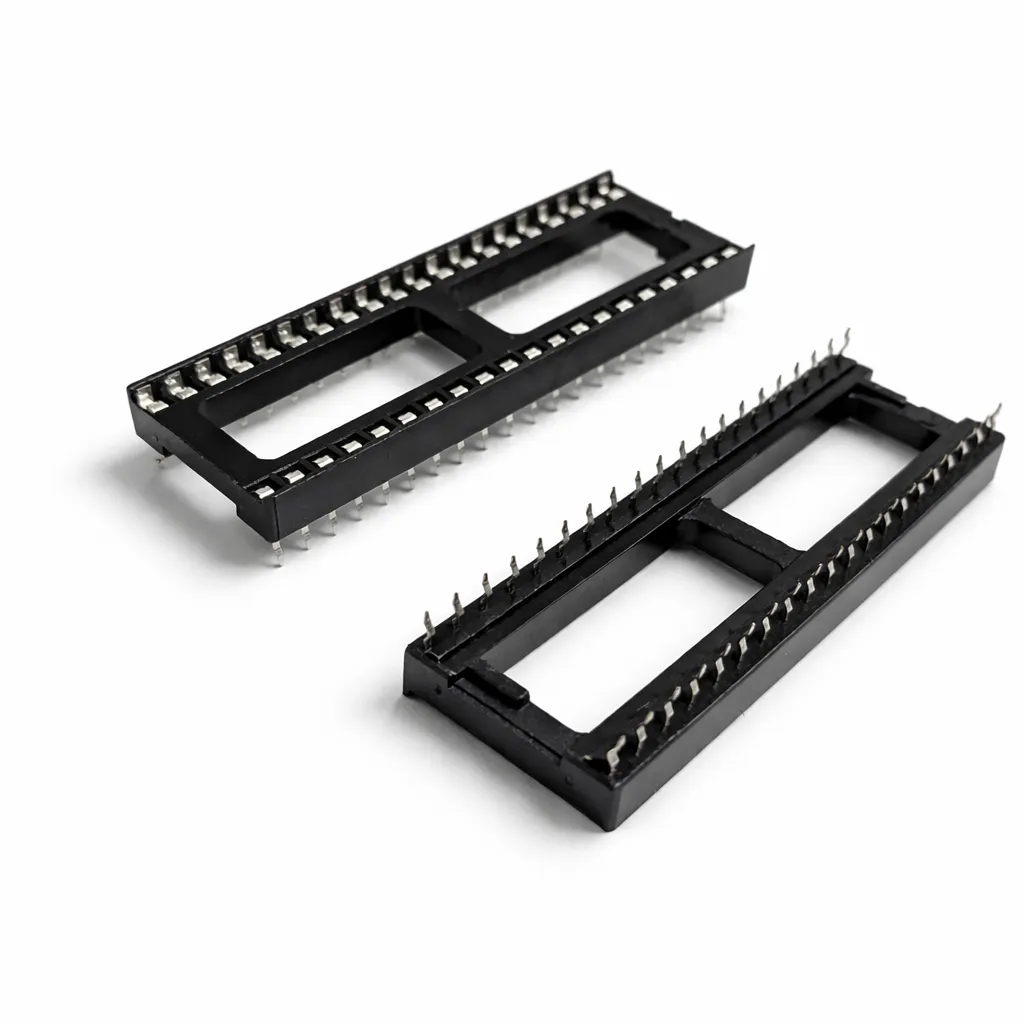
40-Pin Socket Specifications This 40-pin DIP socket is designed for reliable installation of integrated circuits and arcade daughter boards that use a standard 40-pin layout. Using a socket allows the chip or module to be easily removed or replaced without soldering directly to the PCB, helping protect the board during upgrades, repairs, or troubleshooting. Pin Pitch: 2.54 mm (0.100″) standard DIP spacing Total Pins: 40 pins arranged in two rows (2×20) Mounting Type: Through-hole (THT) for secure soldered installation Compatibility: Designed for standard 40-pin DIP integrated circuits and modules Installation Benefit: Allows ICs to be inserted or removed without repeated soldering Use Case: Ideal for arcade PCB upgrades, ROM installations, and repair work The standard 2.54 mm (0.100″) pin spacing matches the layout used on most classic arcade PCBs and DIP integrated circuits. Once soldered to the board, the socket provides a stable connection while allowing the chip to be safely inserted and removed when needed.
Spark your interest -

Customize Your Galaga Free Play and High Score Save Kit Build your kit exactly how you want it. Choose a Wi-Fi Enabled Kit or a Standard Save Kit. You can also add a processor and/or a 40-pin socket—optional but recommended for easy installation. Learn More About This Kit Click a button to view details, tips, or the installation guide. Main Features Easy installation: No soldering or modifications required—plug in and go. Permanent score saving: Uses a serial EPROM, not failure-prone NVRAM or batteries. High Score Save: Saves the Top 5 scores. Real attract sounds: Off, 25%, 50%, or 100% of the attract cycle. Full attract audio: Set attract to 100% to hear the entire sound rotation. Freeplay: No coins required; Coin Up still supported. Attract mode screen saver: Reduces monitor burn-in. Menu-driven DIP settings: No need to access the PCB. ROM Saver: Remove original program ROMs to reduce power and heat. Cabinet compatibility: Works in Upright or Cocktail cabinets. Additional Features Backup & Restore: Save and restore high scores. Separate score tables: Individual tables for 2, 3, 4, or 5 lives. Wide PCB compatibility: Works on Midway, Namco, and many clone boards. Attract logo choice: Switch between Midway, Namco, or HighScoreSaves. Auto fire option: Toggle via game menu. Extended scoring: Supports 8-digit scoring (up to 99,999,990). Level 255 fix: Allows level progression beyond 255. Four shooting speeds: Normal, Slow, Fast, Fastest. Important Installation Notes Socketed Z80 required: If yours is not socketed, install a 40-pin socket. Read the Galaga Free Play and High Score Save Kit Installation Guide (PDF) before setup. FAQ Which PCBs are supported? This kit supports Midway, Namco, and many clone Galaga PCBs. How many scores are saved? The kit saves the Top 5 high scores, with Backup & Restore options. Does it support Freeplay and Coin-Up? Yes—run in Freeplay or keep Coin Up active. Are attract sounds adjustable? Yes: Off, 25%, 50%, or 100% of attract rotation. What advanced features are included? Includes Auto Fire, Extended Scoring, Level 255 Fix, and multi-speed firing modes. Where can I download the installation guide? Galaga Installation Guide (PDF) Resources Galaga Free Play and High Score Save Kit — Installation Guide (PDF) HighScoreSaves YouTube Channel — Installation Tips HighScoreSaves Facebook Page HighScoreSaves eBay Store

Customize Your Fast Freddie Free Play and High Score Save Kit Build your kit exactly how you want it. Choose a Wi-Fi Enabled Kit or a Standard Save Kit. You can also add a processor and/or a 40-pin socket—optional but recommended for easy installation. Learn More About This Kit Click a button to view details, tips, or the installation guide. Main Features Easy installation: No soldering, board modifications, or special wiring. Plug in and play. Permanent score saving: Uses a serial EPROM (not failure-prone NVRAM or batteries). High Score Save: Displays the Top 10 scores on screen. Attract logo selection: Switch between manufacturer logo and HighScoreSaves logo. Attract sounds: Set to 25%, 50%, or 100% of attract-mode rotation. Freeplay mode: No coins needed — Coin Up still supported. Attract mode screen saver: Helps reduce monitor burn-in. Menu-driven DIP settings: Change options without opening the cabinet. ROM saver: Remove original program ROMs to reduce power. Cabinet support: Works in Upright or Cocktail cabinets. Additional Features Backup & Restore: Save and restore high scores for parties and events. Separate score tables: Different tables for 2, 3, or 4 lives. Important Notes Socketed Z80 required: If your Z80 is not socketed, install a 40-pin socket first. Read the Fast Freddie Installation Guide (PDF) before starting. FAQ Which game does this kit support? This kit is designed specifically for Fast Freddie arcade PCBs. How many high scores are saved? The kit saves and displays the Top 10 scores. Does it support Free Play and Coin Up? Yes — Freeplay mode and Coin Up are both fully supported. Can I change DIP settings without opening the cabinet? Yes — all DIP options are menu-driven. What additional features are included? Backup & Restore, attract-sound options, and separate score tables for multiple lives. Where can I download the Installation Guide? Download it here: Fast Freddie Installation Guide (PDF) . Resources Fast Freddie — Installation Guide (PDF) HighScoreSaves YouTube Channel HighScoreSaves Facebook Page HighScoreSaves on eBay

Customize Your Megazone Free Play and High Score Save Kit Build your kit exactly how you want it. Choose a Wi-Fi Enabled Kit or a Standard Save Kit. You can also add a processor and/or a 40-pin socket — optional but recommended for easy installation. Learn More About This Kit Click a button to view details, tips, or the installation guide. Main Features Easy install — No soldering, board modifications, or special wiring. Plug in and go! Save your scores forever — Uses reliable serial EPROM (not failure-prone NVRAM or batteries). High Score Save — Saves the Top 5 scores. Attract Sounds — Hear what you’ve been missing; can play on every attract screen rotation. Freeplay — No more coins or opening the coin door. Coin Up — Still supports coins if wanted. Attract Mode — Minimizes screen burn. Menu-driven DIP settings — Change DIP switches without opening your game. ROM Saver — Optionally remove original program ROMs to save power. Cabinet support — Works in Upright or Cocktail cabinets. Additional Features Separate score tables — 16 distinct HSS tables (one for each difficulty × lives setting). Backup & Restore — Back up high scores and restore later; ideal for parties. Flip Screen — Rotate the image 180° when needed. Important Installation Notes Requires a 6809E to run. Socket required — Ensure your processor is socketed; otherwise install a 40-pin socket. Read the Megazone Installation Guide (PDF) before setup. FAQ Does this kit permanently save high scores?Yes. Scores are stored in a serial EPROM that keeps data even when powered off. Can I still use coins if Freeplay is enabled?Yes. The kit supports both Freeplay and Coin Up simultaneously. Do I need to solder anything?No soldering is required if your 6809E CPU is already socketed. If not, install a 40-pin socket. How many high score tables?16 total — one for each combination of difficulty × lives. Flip Screen option?Yes — rotate image 180° when needed. Where can I download the installation guide? Megazone Installation Guide (PDF) Resources Megazone Free Play and High Score Save Kit — Installation Guide (PDF) HighScoreSaves YouTube Channel — Installation Tips HighScoreSaves Facebook Page HighScoreSaves eBay Store

Customize Your Time Pilot ’84 Free Play and High Score Save Kit Build your kit exactly how you want it. Choose a Wi-Fi Enabled Kit or a Standard Save Kit. You can also add a processor and/or a 40-pin socket—optional but recommended for easy installation. Learn More About This Kit Click a button to view details, tips, or the installation guide. Main Features Easy install — No soldering, board modifications, or special wiring. Plug in and go. Save your scores forever — Uses reliable serial EEPROM (not failure-prone NVRAM or batteries). High Score Save — Stores the Top 5 scores. Attract Sounds — Hear what you’ve been missing! Enable sound at 100% of the attract screen rotation. Freeplay — No more coins or opening the coin door. Coin Up — Still supports coins if desired. Attract Mode — Minimizes screen burn by avoiding static screens. On-screen DIP settings — Menu-driven; no cabinet pull-out to change physical dip switches. ROM Saver — Original program ROMs can be removed if desired. Cabinet support — Works in Upright and Cocktail cabinets. Additional Features Separate score tables — 16 different HSS tables (one for every difficulty and lives setting). Backup and Restore — Save and restore high scores (perfect before/after parties). Important Installation Notes This kit requires a 6809E CPU to run. Ensure your processor is socketed; if not, install a 40-pin socket for the kit to work. Read the Installation Guide (PDF) before you install. FAQ Do I need to solder anything to install this kit? No. Installation is plug-and-play as long as your 6809E CPU is socketed. If it isn’t, install a 40-pin socket first. What’s the difference between the Wi-Fi and Standard kits? The Wi-Fi kit can upload and view scores online and sync them to your personal web page. The Standard kit saves locally only. Can I upgrade to Wi-Fi later? No. The Wi-Fi hardware must be populated at purchase—there’s no post-purchase upgrade path. How many scores are saved? This Time Pilot ’84 kit saves the Top 5 scores, with 16 different HSS tables depending on difficulty and lives setting. Will this work in my cabinet? Yes. Fully compatible with Upright and Cocktail Time Pilot ’84 cabinets. Can I back up or restore high scores? Yes. Use the Backup/Restore feature to save scores before events and restore afterward. Does it support attract sounds? Yes. You can enable attract sounds at 100% of the rotation cycle. What’s the ROM Saver feature? You may remove the original program ROMs if desired since the kit runs the program directly. Does it support Freeplay and Coin Up? Yes. Enable Freeplay or continue using coins/tokens if preferred. Where can I find the installation guide? You can download it here: Time Pilot ’84 Installation Guide (PDF) . Resources Time Pilot ’84 — Installation Guide (PDF) HighScoreSaves YouTube Channel — Installation Tips HighScoreSaves Facebook Page HighScoreSaves eBay Store