
Cosmic Avenger Free Play and High Score Save Kit


Product information "Cosmic Avenger Free Play and High Score Save Kit"
Customize Your Cosmic Avenger Free Play and High Score Save Kit
Build your kit exactly how you want it. Choose a Wi-Fi Enabled Kit or a Standard Save Kit. You can also add a processor and/or a 40-pin socket—optional but recommended for easy installation.
Learn More About This Kit
Click a button to view details, tips, or the installation guide.
Main Features
- Easy installation: No soldering or modifications required.
- Reliable score saving: Serial EEPROM (not NVRAM or batteries).
- High Score Save: Stores the Top 7 scores.
- Attract Sounds: Plays audio on 100% of attract rotations.
- Freeplay mode: Unlimited play with no coins.
- Coin-Up support: Still accepts quarters/tokens.
- Attract Mode: Reduces screen burn with gameplay demos.
- On-screen DIP settings: Adjust settings in menu.
- ROM Saver: Optionally remove original program ROMs.
- Cabinet compatibility: Works in Upright and Cocktail machines.
Additional Features
- Separate score tables: Eight tables for lives/difficulty settings.
- Backup & Restore: Perfect for parties and tournaments.
- Stealth Mode: Boots to appear stock while keeping save features.
Important Installation Notes
- This kit requires a Z80 processor.
- A socketed CPU is required — add a 40-pin socket if needed.
- Read the Cosmic Avenger Free Play and High Score Save Kit Installation Guide / Manual (PDF) before setup.
FAQ
How many scores are saved?
Saves the Top 7 high scores.
Does it support Freeplay and coin use?
Yes — use Freeplay or Coin-Up.
Are separate score tables included?
Yes — 8 high-score tables based on difficulty and lives.
What is Stealth Mode?
Boots to appear original while keeping save features active.
Which processor is required?
A Z80 processor, must be socketed.
Where can I download the Installation Guide?


Login
1 review
September 23, 2025 2:43 PM
Cosmic Avenger
I recently purchased this pcb and was super happy Highscoresaves.com offered a kit that saves high scores and has a free play option. It makes you want to play the game more when there is a high score to beat. I also really like the option of adjusting how often the attract sounds play. The kit is super easy to install.
Level up with these!

Z80 8-Bit Microprocessor (40-Pin CPU) The Z80 is a classic 8-bit microprocessor widely used in arcade machines from the late 1970s through the 1980s. This processor served as the main CPU in many arcade PCBs, executing game code, processing player inputs, and coordinating communication with memory, sound hardware, and video circuitry. The Z80 became one of the most popular processors in arcade hardware due to its reliability and expanded instruction set compared to earlier CPUs. Because of its widespread use, the Z80 is commonly found in a variety of classic arcade games and remains an essential component when repairing or restoring vintage arcade boards. This processor uses a standard 40-pin DIP (Dual In-line Package) and installs directly into a compatible socket on the arcade PCB. Replacing a faulty CPU can often resolve boot failures, lockups, or other operational issues in aging arcade hardware. Key Features Z80 8-bit microprocessor Standard 40-pin DIP package Common CPU used in many classic arcade PCBs Handles core game logic, timing, and system control Ideal for arcade PCB troubleshooting, repair, and restoration Used In Arcade Games Such As Donkey Kong Galaga Donkey Kong Jr. Frogger Galaxian Dig Dug Xevious …and many other classic arcade titles Installation Notes Installs into a standard 40-pin DIP socket on compatible arcade PCBs Ensure correct notch orientation when installing the CPU Recommended for technicians performing arcade board repair or restoration *Manufacturer brands or markings may vary.
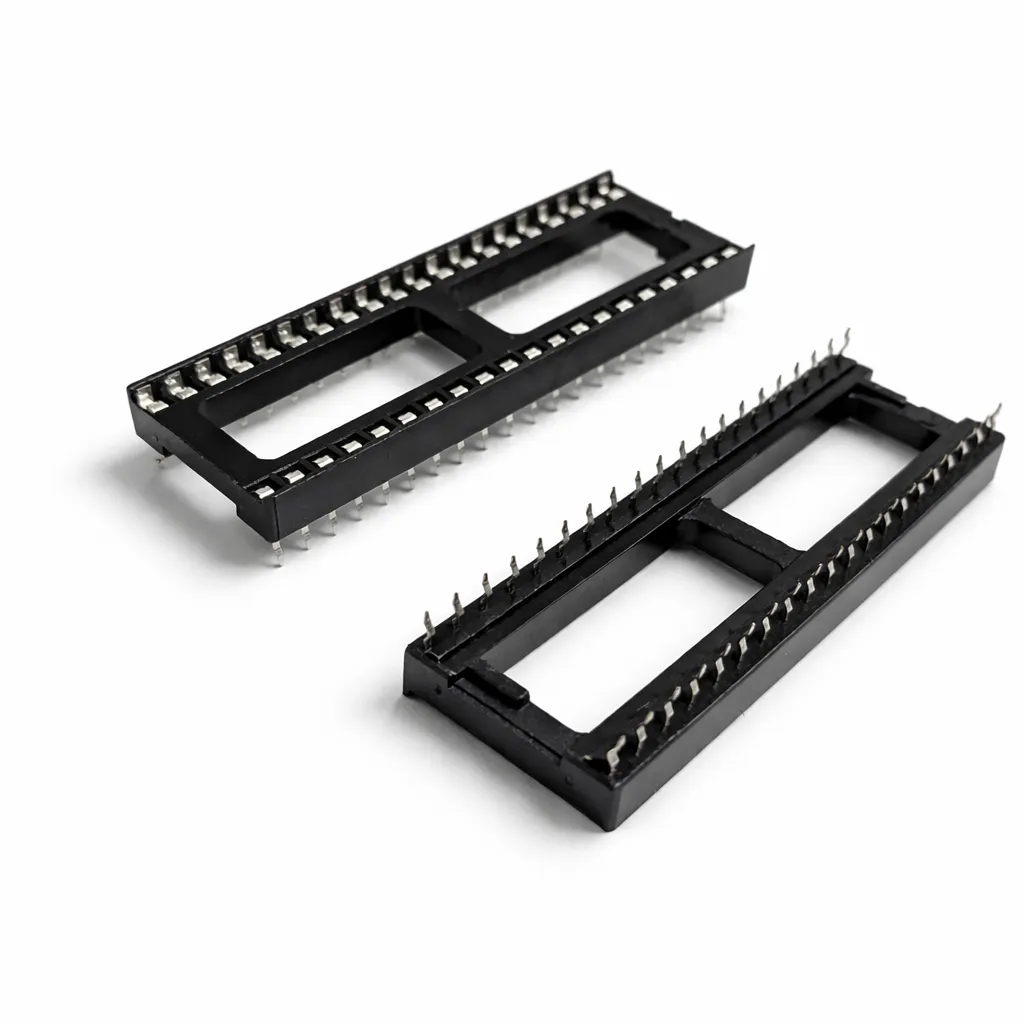
40-Pin Socket Specifications This 40-pin DIP socket is designed for reliable installation of integrated circuits and arcade daughter boards that use a standard 40-pin layout. Using a socket allows the chip or module to be easily removed or replaced without soldering directly to the PCB, helping protect the board during upgrades, repairs, or troubleshooting. Pin Pitch: 2.54 mm (0.100″) standard DIP spacing Total Pins: 40 pins arranged in two rows (2×20) Mounting Type: Through-hole (THT) for secure soldered installation Compatibility: Designed for standard 40-pin DIP integrated circuits and modules Installation Benefit: Allows ICs to be inserted or removed without repeated soldering Use Case: Ideal for arcade PCB upgrades, ROM installations, and repair work The standard 2.54 mm (0.100″) pin spacing matches the layout used on most classic arcade PCBs and DIP integrated circuits. Once soldered to the board, the socket provides a stable connection while allowing the chip to be safely inserted and removed when needed.
Spark your interest -

Customize Your Bomb Jack Free Play and High Score Save Kit Upgrade your original Bomb Jack arcade PCB with this Free Play and High Score Save Kit designed by HighScoreSaves for fast installation, stable score retention, authentic attract sounds, and menu driven configuration. This plug and play upgrade preserves the original Tehkan experience while adding modern convenience features that make gameplay smoother and maintenance easier. Build your kit exactly how you want it. Choose a Wi-Fi Enabled Kit or a Standard Save Kit. You can also add a processor and/or a 40-pin socket—optional but recommended for easy installation. Learn More About This Kit Click a button to view details, tips, or the installation guide. Main Features Easy install: No soldering, board modifications, or special wiring—plug in and go. Save your scores forever: Uses serial EEPROM (not failure-prone NVRAM or batteries). High Score Save: Saves the Top 10 scores on screen. Real attract sounds: Not just music—gameplay sounds too. Attract sounds: Set at 25%, 50%, or 100% of the attract screen rotation. Freeplay and Coin-Up: Play without coins or keep quarters/tokens enabled. Attract mode: Helps minimize screen burn by avoiding static screens. Menu-driven DIP settings: Change options on-screen—no cabinet pulling for DIP switches. ROM Saver: Optionally remove original program ROMs to save power. Cabinet compatibility: Works in Upright and Cocktail cabinets. Additional Features Backup and Restore: Back up high scores and restore later—ideal before or after game-room parties. Fast boot / Self-test: Quick startup; self-test accessible via the main menu or by setting all PCB DIP switches to OFF. Optional Features View Bomb Jack High Scores Want to take your scores beyond the cabinet? Before adding this kit to your cart, simply use the dropdown labeled “Make this WiFi Enabled to upload your scores?” and select Yes or No. Choosing Wi-Fi enables secure online score uploads so you can compare your performance globally, within your country, or even against players in your own game room. All Global High Scores Important Installation Notes Socketed Z80 required: If your Z80 isn’t socketed, install a 40-pin socket for the kit to work. Read the Bomb Jack Free Play and High Score Save Kit Installation Guide / Manual (PDF) before setup. Just the FAQ's How many scores are saved?The kit saves the Top 10 scores on screen. Does it support Freeplay and coin operation?Yes. Run in Freeplay or keep coin-up enabled—your choice. What are “real attract sounds”?Attract mode can play gameplay sound effects for authentic demos. Can I adjust attract sounds?Yes. Set attract sounds to 25%, 50%, or 100%. Can I change DIP settings without opening the cabinet?Yes — use the menu-driven DIP settings. How do I access self-test?From the main menu or by setting all PCB DIP switches to OFF. What is ROM Saver?The kit runs the game and reduces power usage when original ROMs are removed. Where can I download the Installation Guide? Download the Bomb Jack Free Play and High Score Save Kit Setup Instructions / Installation Manual (PDF) . Do I need a socketed CPU?Yes. A socketed Z80 is required. Resources Bomb Jack Free Play and High Score Save Kit — Installation Guide / Manual (PDF) HighScoreSaves YouTube Channel — Installation Tips HighScoreSaves Facebook Page HighScoreSaves eBay Store

Customize Your Venture Free Play and High Score Save Kit Build your kit exactly how you want it. Choose a Wi-Fi Enabled Kit or a Standard Save Kit. You can also add a processor and/or a 40-pin socket—optional but recommended for easy installation. Learn More About This Kit Click a button to view details, tips, or the installation guide. Main Features Easy install — No soldering, board modifications, or special wiring. Just plug in and go. Save your scores forever — Uses reliable serial EEPROM (no failure-prone NVRAM or batteries). High Score Save — Stores the Top 5 scores. Attract Sounds — Set to 25%, 50%, or 100% of the attract rotation. Freeplay — No more coins or opening the coin door. Coin Up — Still supports coins or tokens. Attract Mode — Reduces screen burn by avoiding static screens. Copyright message — Choose original manufacturer or Highscoresaves branding. On-screen DIP settings — Change dips via menu; no cabinet pull-out required. ROM Saver — Remove original program ROMs if desired. Cabinet support — Works in Upright and Cocktail cabinets. Additional Features Backup and Restore — Save and restore high scores. Reset Button — Restart without powering off (enable in menu). Separate score tables — For 2, 3, 4, or 5 lives. Fast boot — No long initialization times. Stealth Mode — Boots straight to the game. Important Installation Notes Ensure your 6502 CPU is socketed; if not, install a 40-pin socket. Read the Installation Guide (PDF) before installing. FAQ Is installation truly plug-and-play? Yes. No soldering or mods are needed if your 6502 is already socketed. What’s the difference between Wi-Fi and Standard kits? The Wi-Fi kit uploads/syncs scores online; the Standard kit saves locally. How many scores does it save? The kit stores the Top 5 scores. Does it support Freeplay and Coin Up? Yes — use Freeplay or accept coins/tokens. Are there separate score tables for different lives? Yes — HSS tables for 2, 3, 4, or 5 lives. Can I back up and restore high scores? Yes — ideal before/after parties or events. Which cabinets are supported? Upright and Cocktail Venture cabinets. What does ROM Saver do? It allows optional removal of the original program ROMs. What CPU is required? A socketed 6502 CPU. Where can I download the installation guide? Venture Installation Guide (PDF) Resources Venture — Installation Guide (PDF) HighScoreSaves YouTube — Install Tips HighScoreSaves on Facebook HighScoreSaves eBay Store

Customize Your Mappy Free Play and High Score Save Kit Build your kit exactly how you want it. Choose a Wi-Fi Enabled Kit or a Standard Save Kit. You can also add a processor and/or a 40-pin socket—optional but recommended for easy installation. Learn More About This Kit Click a button to view details, tips, or the installation guide. Main Features Easy install: No soldering, board modifications, or special wiring—just plug in and play. Save your scores forever: Uses reliable serial EPROM, not failure-prone NVRAM or batteries. High Score Save: Stores the Top 5 scores. Attract sounds: Plays on every attract cycle. Full attract sounds: Includes the dot munching sound from the attract gameplay screen. Freeplay: No more coins needed. Coin up: Keep coin operation enabled if desired. Attract mode: Minimizes static screens to reduce burn-in. Menu-driven DIP settings: Full on-screen DIP adjustment menu. ROM Saver: Optionally remove original program ROMs to reduce power usage. Cabinet compatibility: Works in Upright or Cocktail cabinets. Additional Features Separate score tables: Distinct tables for 2, 3, 4, or 5 lives. Backup & Restore: Save and reload high scores anytime. Selectable character names: Choose between Goro or Meowky. Important Installation Notes Processor required: Must have a 6809E installed. Socketed CPU required: If your CPU is not socketed, install a 40-pin socket. Read the Mappy Free Play and High Score Save Kit Installation Guide / Manual (PDF) before setup. FAQ Does this kit permanently save scores?Yes—your Top 5 scores are permanently saved using serial EPROM. Freeplay and coin operation?Yes, choose between Freeplay or Coin-Up. Attract sounds?Includes the full attract sound set including dot munching. Soldering required?No—just plug into a socketed 6809E processor. Backup & Restore?Yes—save and load scores anytime. Download the Installation Guide Download the Mappy Free Play and High Score Save Kit Setup Instructions / Installation Manual (PDF) Socketed CPU required?Yes—a socketed 6809E. Resources Mappy Free Play and High Score Save Kit — Installation Guide (PDF) HighScoreSaves YouTube Channel — Installation Tips HighScoreSaves Facebook Page HighScoreSaves eBay Store

Customize Your Frogger Free Play and High Score Save Kit Build your kit exactly how you want it. Choose a Wi-Fi Enabled Kit or a Standard Save Kit. You can also add a processor and/or a 40-pin socket—optional but recommended for easy installation. Learn More About This Kit Click a button to view details, tips, or the installation guide. Main Features Easy installation: No soldering, board modifications, or special wiring. Plug in and play. Permanent score saving: Uses a serial EPROM, not failure-prone NVRAM or batteries. High Score Save: Saves the Top 5 scores on screen. Initial entry: Enter and save your initials. Attract logo choice: Switch between manufacturer logo and HighScoreSaves logo. Freeplay mode: No coins needed; Coin Up still supported. Attract mode screen saver: Reduces monitor burn-in. Menu-driven DIP settings: Change options without pulling the cabinet. ROM Saver: Remove original program ROMs to reduce power use. Cabinet support: Works in Upright or Cocktail cabinets. Additional Features Backup & Restore: Save and restore your highscores anytime. Separate score tables: Unique high-score tables for 2, 3, or 4 lives. Stealth Mode: Access the menu by holding Player 1 while powering on. Important Installation Notes Socketed Z80 required: Install a 40-pin socket if your Z80 is soldered directly. Read the Frogger Free Play and High Score Save Kit Installation Guide (PDF) before starting. FAQ Which game does this kit support?This kit is designed specifically for Frogger arcade PCBs. How many high scores are saved?The kit saves the Top 5 scores with initials. Does it support Freeplay and Coin Up?Yes — you can enable Freeplay or keep Coin Up active. Can I change DIP settings?Yes — all DIP options are menu-driven via the on-screen menu. Extra features?Includes Backup & Restore, separate score tables, and Stealth Mode. Where’s the install guide? Download the Frogger Installation Guide (PDF) Resources Frogger Free Play and High Score Save Kit — Installation Guide (PDF) HighScoreSaves YouTube Channel — Installation Tips HighScoreSaves Facebook Page HighScoreSaves eBay Store

Customize Your Super Multipede Multigame Free Play and High Score Save Kit Build your kit exactly how you want it. Choose a Wi-Fi Enabled Kit or a Standard Save Kit. You can also add a processor and/or a 40-pin socket — optional but recommended for easy installation. Learn More About This Kit Click a button to view details, tips, or the installation guide. Compatibility: This Super Multipede multigame kit installs on a Millipede PCB only. Main Features Easy install: No soldering, board modifications, or special wiring. Plug in and go. Save your scores forever: Uses reliable serial EEPROM (not failure-prone NVRAM or batteries). High Score Save: Centipede/Millipede save Top 8; Super Breakout & Warlords save Top 5. Separate score tables: Distinct tables for Centipede, Millipede, and Super Breakout. ROM revisions: Uses the most current ROM revisions. Attract sounds: Set to 25%, 50%, or 100% per game. Freeplay & Coin-Up: Play without coins or keep quarters enabled (Warlords is Freeplay only). Attract mode: Minimizes screen burn; no static screens. Menu-driven DIP settings: Change DIP switches without opening your cabinet. Cabinet support: Works in Upright or Cocktail; flips screen in cocktail mode for Centipede/Millipede. Super Breakout & Warlords use P1 side. Additional Features Backup & Restore: Save and restore high scores (great before/after parties). Reset button: Restart a game without powering off (enable in menu). Menu for game select: Hold P1 for 4 seconds, then release. Stealth Mode: Choose boot game (last played or from list). ROM Saver: All original program ROMs (1H–1M) can be removed. Copyright options: Choose original Atari or HighScoreSaves branding. Games List Centipede Millipede Super Breakout Warlords Important Installation Notes Compatibility: This Super Multipede multigame kit installs on a Millipede PCB only. Socketed 6502 required: If your 6502 isn’t socketed, install a 40-pin socket for this kit to work. Read the Super Multipede Installation Guide (PDF) before setup. Just the FAQ's Which PCB is required?This kit installs on a Millipede PCB only. Which games are included?The kit includes Centipede, Millipede, Super Breakout, and Warlords. Warlords 4-player support?Only 1 player is supported due to hardware limitations. How many scores are saved?Centipede & Millipede: Top 8Super Breakout & Warlords: Top 5 Does it support Freeplay and coin-up?Yes. Note: Warlords is Freeplay only. How to select a game?Hold P1 for 4 seconds, then release. What is Stealth Mode?Choose what game the kit boots into—either last played or fixed selection. What is ROM Saver?You may remove all original program ROMs (1H–1M); program runs from the kit. Where to download the Installation Guide?Super Multipede Installation Guide (PDF) Do I need a socketed CPU?Yes — a socketed 6502 is required. Resources Super Multipede — Installation Guide (PDF) HighScoreSaves YouTube Channel HighScoreSaves Facebook Page HighScoreSaves eBay Store
You may be interested in -
Z80 8-Bit Microprocessor (40-Pin CPU) The Z80 is a classic 8-bit microprocessor widely used in arcade machines from the late 1970s through the 1980s. This processor served as the main CPU in many arcade PCBs, executing game code, processing player inputs, and coordinating communication with memory, sound hardware, and video circuitry. The Z80 became one of the most popular processors in arcade hardware due to its reliability and expanded instruction set compared to earlier CPUs. Because of its widespread use, the Z80 is commonly found in a variety of classic arcade games and remains an essential component when repairing or restoring vintage arcade boards. This processor uses a standard 40-pin DIP (Dual In-line Package) and installs directly into a compatible socket on the arcade PCB. Replacing a faulty CPU can often resolve boot failures, lockups, or other operational issues in aging arcade hardware. Key Features Z80 8-bit microprocessor Standard 40-pin DIP package Common CPU used in many classic arcade PCBs Handles core game logic, timing, and system control Ideal for arcade PCB troubleshooting, repair, and restoration Used In Arcade Games Such As Donkey Kong Galaga Donkey Kong Jr. Frogger Galaxian Dig Dug Xevious …and many other classic arcade titles Installation Notes Installs into a standard 40-pin DIP socket on compatible arcade PCBs Ensure correct notch orientation when installing the CPU Recommended for technicians performing arcade board repair or restoration *Manufacturer brands or markings may vary.

6502 8-Bit Microprocessor (40-Pin CPU) The 6502 is a classic 8-bit microprocessor widely used in early arcade hardware and computer systems. This 40-pin DIP CPU served as the primary processor for many classic arcade PCBs and is responsible for executing the game program, processing player inputs, and controlling overall system timing. Many Atari arcade boards rely on the 6502 processor to manage gameplay logic and communicate with other hardware components such as ROM chips, RAM, and video circuitry. A working CPU is essential for proper board operation, making the 6502 a common replacement component during arcade PCB repair and restoration. Key Features 6502 8-bit microprocessor Standard 40-pin DIP (Dual In-line Package) Commonly used in classic arcade PCBs Handles game logic, timing, and hardware control Ideal for arcade board troubleshooting and repair Used In Arcade Games Such As Asteroids Battlezone Centipede Tempest Warlords Missile Command Gravitar Red Baron Because the 6502 processor was widely adopted by Atari and other arcade manufacturers, it appears on many classic arcade boards from the late 1970s and early 1980s. Installation Notes Installs in a standard 40-pin DIP socket Carefully align the notch orientation when installing Recommended for technicians performing arcade PCB repair or restoration *Manufacturer brands may vary.

Any Coin Mech for Home Arcades The Any Coin Mech is designed as a direct drop-in replacement for many popular arcade coin mechanisms, including models from Happ, Coinco, Imonex, and other manufacturers. It provides a simple and reliable solution for restoring or upgrading the coin acceptance system in arcade machines. This versatile coin mechanism is ideal for home arcade cabinets and personal arcade setups where flexibility and reliability are important. The design accepts multiple coin types without requiring adjustments, making it easy to install and use. Key Features Direct drop-in replacement for many existing arcade coin mechanisms Accepts quarters, 0.984″ tokens, and dimes with no adjustment required Engineered to reduce coin jams and improve long-term reliability Includes four durable plastic mounting pegs that will not rust Proudly made in the USA Ideal for home arcade cabinets and custom arcade builds Compatibility This coin mechanism has been tested with a wide range of arcade hardware and is compatible with machines manufactured by: Atari Bally Midway Gottlieb Stern Taito Williams Sega and many other arcade manufacturers The Any Coin Mech is a convenient solution for arcade restorations and modern home arcade builds that require a dependable coin acceptor capable of handling multiple coin types.

Arcade PCB Mounting Feet Kit This PCB mounting feet kit provides a simple and reliable way to secure arcade circuit boards inside a cabinet. These plastic stand-offs elevate the PCB slightly above the mounting surface, helping protect the board from shorts, vibration, and damage caused by direct contact with the cabinet or mounting panel. Properly mounting a PCB is important for long-term reliability. Using mounting feet keeps the board stable while also allowing airflow beneath the PCB, which can help reduce heat buildup during operation. Kit Includes 4 white PCB mounting feet 4 mounting screws Installation Notes Designed to raise the PCB off the mounting surface for protection Helps prevent shorts and accidental contact with cabinet hardware Recommended for arcade PCB installations, repairs, and restorations We recommend using these mounting feet whenever installing or replacing an arcade PCB to ensure the board is properly supported and secured inside the cabinet.

Easy CoinUp (E.C.U.) — Quarter-Style Coin-Up Switch It Just Makes Sense! We’ve all seen it: a loose switch dangling from the coin door, or a hole drilled in the cabinet just to add credits. Many games offer a Free Play mode, but some disable attract sounds or visuals—so passers-by never see or hear the game in action. Easy CoinUp fixes that. It’s a pushbutton that looks like a quarter, so everyone knows exactly what it does: add a credit. Installation is simple and causes no permanent damage beyond applying adhesive to the metal coin door. Installation Instructions (Quick & Easy) Peel the backing liner and apply the E.C.U. where you want it mounted. Wrap the “tail” around the coin door, pressing firmly so the adhesive bonds (industrial 3M 300LSE—once it sticks, it sticks). Peel the second liner and apply the “Quarter” overlay to the front of the switch. Solder two wires from the tail’s solder pads to the machine’s coin switch. The E.C.U. is a membrane SPST switch; your machine must expect a single circuit closure (typical for most arcade and pinball machines). Insulate the E.C.U. pins with electrical tape after soldering so they can’t touch grounded metal or other circuits. Note: Installation requires basic soldering. Tips & Tricks Thoroughly clean the mounting area; finish with rubbing alcohol and let it evaporate. Mount near the “Insert Coin” slots so players find it quickly. Avoid high-friction spots on the coin door; look for rubbed paint or scratches and choose a smoother area. If the conductive circuit in the tail is worn through, the switch will stop working—route and secure it thoughtfully. Keep out of reach of children—they may peel or try to swallow the parts.

DK / DK Jr. Pin-Harness to Card-Edge Adapter This adapter converts the original pin-style cabinet wiring harness found in classic Donkey Kong and Donkey Kong Jr. cabinets to the newer card-edge connector used on later Nintendo board sets—making swaps and upgrades fast and reversible. Key Features Direct, plug-in conversion from pin-header harness to card-edge connector. No cutting or permanent changes to the original cabinet wiring. Clean signal routing for power, video, audio, and controls. Keyed/marked orientation to help prevent mis-connection. Compatibility Cabinets: Nintendo DK and DK Jr. with pin-style harness. Boards: Later Nintendo board sets using a card-edge connector (verify your specific PCB before installation). Installation Notes Power off the cabinet before connecting or removing the adapter. Match orientation/keys and seat connectors fully; avoid forcing the edge. No soldering required for standard harnesses. Tip: Check your cabinet’s wiring diagram and the target PCB pinout to confirm signal order before first power-on.

8035 8-Bit Microcontroller (Sound CPU, 40-Pin DIP) The 8035 is an 8-bit microcontroller from the Intel MCS-48 family that was commonly used as the sound CPU on classic arcade PCBs. This processor manages audio control, timing signals, and communication with the sound hardware that generates music and sound effects during gameplay. In many arcade boards, the 8035 operates alongside the main game processor and is dedicated to handling audio-related tasks. By separating sound processing from the main CPU, arcade hardware was able to deliver more complex sound effects and music while maintaining smooth gameplay performance. The chip uses a standard 40-pin DIP (Dual In-line Package) and installs into a compatible socket on the arcade PCB. Because the sound CPU is critical for proper audio operation, the 8035 is often replaced during troubleshooting and restoration of classic arcade boards. Key Features 8035 8-bit microcontroller from the Intel MCS-48 family Commonly used as the sound CPU on arcade PCBs Standard 40-pin DIP package Handles audio control, timing, and sound hardware communication Ideal for arcade PCB repair and restoration Used In Arcade Games Such As Donkey Kong Donkey Kong Jr. Donkey Kong 3 …and other classic Nintendo arcade titles Installation Notes Installs into a standard 40-pin DIP socket on compatible arcade PCBs Ensure the notch orientation matches the socket when installing Recommended for technicians performing arcade PCB troubleshooting or repair *Brand or manufacturer markings may vary (for example NEC 8035 or compatible equivalents).

Arcade Button Harness with 6-Pin Header This arcade button harness is designed to connect additional control panel buttons to compatible arcade hardware such as the ArPiCade system and other arcade PCBs. It provides a simple wiring solution for adding extra player buttons, commonly used for functions such as buttons 4, 5, and 6 on arcade control panels. Each harness is approximately 4 feet long, providing enough length for clean routing inside an arcade cabinet. The wiring is designed for reliable arcade use and connects easily to standard microswitch terminals found on arcade pushbuttons. Key Features Compatible with ArPiCade and other arcade control interfaces Approximately 4 feet long for flexible cabinet installation .187 female quick disconnect terminals for standard arcade microswitches 6-pin header connector for direct connection to PCB or ArPiCade input header Supports additional control panel buttons such as buttons 4, 5, and 6 Typical Uses Connecting extra action buttons on arcade control panels ArPiCade player 1 and player 2 extended button inputs Custom arcade cabinet builds and modifications Arcade hardware upgrades requiring additional button wiring This harness is a convenient solution for adding additional button inputs to arcade systems while maintaining clean and organized wiring inside the cabinet.

Konami 4-Player Kick Harness – JAMMA+ Auxiliary Harness The Konami 4-Player Kick Harness allows you to connect the Player 3 or Player 4 joystick and buttons for Konami four-player arcade games. This harness connects directly to the PCB using a 15-pin header and provides properly numbered wiring to simplify installation in your arcade cabinet. Key Features Compatible with Konami 4-player arcade games Allows connection of Player 3 or Player 4 joystick and buttons Approximately 3 feet long for flexible cabinet installation .187 female quick disconnects for secure microswitch connections Includes enough ground connectors for arcade control wiring 15-pin header connects directly to your PCB Header is numbered to match wiring locations on your control panel Wire colors may vary, but pin numbers remain consistent Pinout Reference Download the full Konami 4-player kick harness pinout reference: Konami Kick Harness Pinout PDF Please Note: You will need two harnesses if you want to connect both Player 3 and Player 4 controls to your control panel.

6809E 8-Bit Microprocessor (40-Pin CPU) The 6809E is a powerful 8-bit microprocessor commonly used in classic arcade PCBs during the early and mid-1980s. This processor served as the main CPU for many arcade boards, executing game code, handling player inputs, and coordinating communication between memory, sound hardware, and video circuitry. Known for its advanced architecture compared to earlier processors, the 6809E provided improved instruction sets and efficient memory addressing, making it a popular choice for more complex arcade games. A properly functioning CPU is essential for reliable board operation, making the 6809E a common replacement component during arcade PCB repair and restoration. Key Features Motorola 6809E 8-bit microprocessor Standard 40-pin DIP (Dual In-line Package) Used as the main CPU in many classic arcade boards Handles game logic, timing, and hardware communication Ideal for arcade PCB repair and restoration work Used In Arcade Games Such As Circus Charlie Juno First Track & Field Hyper Sports Star Wars Qix …and many other classic arcade titles Some arcade boards use the 6809E processor in conjunction with other supporting chips or adapters. In certain Konami systems, the 6809E can be used with a 42-pin Konami-1 adapter, which is included with some HighScoreSaves kits. Installation Notes Installs into a standard 40-pin DIP socket on compatible arcade PCBs Ensure proper notch orientation when installing the CPU Recommended for technicians performing arcade board troubleshooting or restoration *Can be used with a 42-pin Konami-1 adapter (included with some HighScoreSaves kits). *Manufacturer brands may vary.

8080 8-Bit Microprocessor (40-Pin CPU) The Intel 8080 is a classic 8-bit microprocessor that powered many early arcade machines. Introduced in the mid-1970s, the 8080 became one of the foundational CPUs used in the first generation of dedicated arcade hardware. On arcade PCBs, the 8080 serves as the main processor responsible for executing the game program, handling player inputs, controlling game timing, and coordinating communication with video and sound hardware. Because it manages core gameplay functions, a properly functioning CPU is essential for reliable arcade board operation. The processor uses a standard 40-pin DIP (Dual In-line Package) and installs into a compatible socket on the arcade PCB. During arcade board troubleshooting or restoration, the 8080 is sometimes replaced to resolve boot failures, game resets, or non-functioning boards. Key Features Intel 8080 8-bit microprocessor Standard 40-pin DIP package Main CPU used in early arcade hardware Handles game logic, timing, and system control Suitable for arcade PCB repair and restoration Used In Arcade Games Such As Space Invaders Space Invaders Deluxe …and other early arcade titles using 8080-based hardware Installation Notes Installs into a standard 40-pin DIP socket on compatible arcade PCBs Ensure correct notch orientation when installing Recommended for technicians performing arcade PCB troubleshooting or restoration *Manufacturer brands or markings may vary.
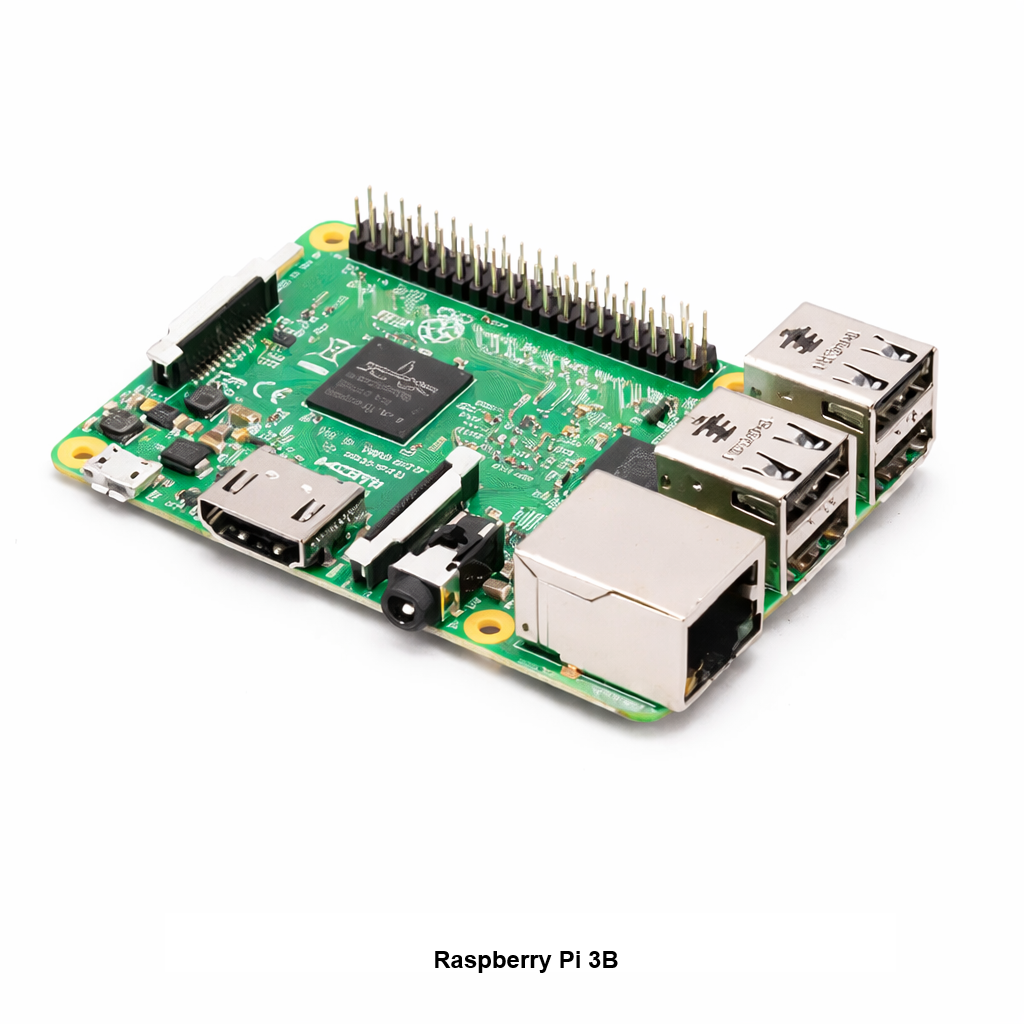
Raspberry Pi - Model 3B Overview The Raspberry Pi - Model 3B is a compact single board computer commonly used for embedded projects and arcade builds. It is often paired with an ArPiCade Raspberry JAMMA Adapters to power a JAMMA cabinet setup. You'll Need (Not Included) Micro SD card with an ArPiCade image installed One of the following ArPiCade Raspberry JAMMA units: ArPiCade Mini Raspberry Pi JAMMA Adapter ArPiCade Raspberry Pi JAMMA Adapter ArPiCade Raspberry Pi JAMMA Adapter – 4 Player Keyboard and mouse (for menu customization) Specifications Raspberry Pi 3 Model B is the earliest model of the third-generation Raspberry Pi. Quad Core 1.2GHz Broadcom BCM2837 64bit CPU 1GB RAM BCM43438 wireless LAN and Bluetooth Low Energy (BLE) on board 100 Base Ethernet 40-pin extended GPIO 4 USB 2 ports 4 Pole stereo output and composite video port Full size HDMI® CSI camera port for connecting a Raspberry Pi camera DSI display port for connecting a Raspberry Pi touchscreen display Micro SD port for loading your operating system and storing data Upgraded switched Micro USB power source up to 2.5A
40-Pin Socket Specifications This 40-pin DIP socket is designed for reliable installation of integrated circuits and arcade daughter boards that use a standard 40-pin layout. Using a socket allows the chip or module to be easily removed or replaced without soldering directly to the PCB, helping protect the board during upgrades, repairs, or troubleshooting. Pin Pitch: 2.54 mm (0.100″) standard DIP spacing Total Pins: 40 pins arranged in two rows (2×20) Mounting Type: Through-hole (THT) for secure soldered installation Compatibility: Designed for standard 40-pin DIP integrated circuits and modules Installation Benefit: Allows ICs to be inserted or removed without repeated soldering Use Case: Ideal for arcade PCB upgrades, ROM installations, and repair work The standard 2.54 mm (0.100″) pin spacing matches the layout used on most classic arcade PCBs and DIP integrated circuits. Once soldered to the board, the socket provides a stable connection while allowing the chip to be safely inserted and removed when needed.