

Darksoft CPS1 | CPS2 | Taito F3 LCD Protector
LCD Protector Case for Darksoft CPS1, CPS2, and Taito F3 Multigame Kits Protect and properly mount your Darksoft LCD selector screen with this purpose-built enclosure. This LCD protector case is designed specifically for the LCD selector displays used with Darksoft CPS1, Darksoft CPS2, and Darksoft Taito F3 multigame kits. It provides a clean, secure housing solution that protects the screen while improving installation and usability inside your arcade cabinet. The case features a snap-fit design that requires no screws or additional hardware. Simply place the LCD into the rear housing and snap the front cover into position for a secure fit. This makes installation quick, simple, and easily reversible if needed. Designed for Arcade Use An integrated rear stand positions the LCD at an ideal viewing angle, making it perfect for mounting inside a coin door or within the cabinet interior. This allows easy navigation of game menus without removing hardware or making adjustments during operation. Depending on your cabinet layout, a longer LCD extension cable may be required for optimal placement. These cables are available separately if additional reach is needed. Durable 3D Printed Construction Each enclosure is produced using a textured 3D printed finish, providing improved durability and a more refined appearance compared to standard smooth prints. The textured surface helps reduce visible layer lines and gives the case a more professional, arcade-quality look. Key Features Designed for Darksoft CPS1, CPS2, and Taito F3 multigame LCD selector screens Snap-fit assembly with no screws or hardware required Integrated rear stand for optimal viewing angle Protects LCD screen from damage and wear Textured 3D printed finish for improved appearance and durability Ideal for coin door or internal cabinet mounting What’s Included 1 × LCD protector case (front and rear housing) Integrated rear stand Important Notes LCD screen is NOT included Connecting cables are NOT included This is an accessory product and does not function independently Designed specifically for Darksoft multigame kit LCD selector displays Whether you are finishing a clean install or upgrading your setup, this LCD protector case for Darksoft multigame kits provides a simple, reliable, and professional solution for mounting and protecting your LCD display.

Darksoft CPS1 | CPS2 | Taito F3 Long Flat Cable
LCD Extension Cable for Darksoft CPS1, CPS2, and Taito F3 Multigame Kits Position your Darksoft LCD game selector where it is easier to view and access with this approximately 3-foot / 100-centimeter extension cable. This cable is designed for the LCD selector displays used with compatible Darksoft CPS1, Darksoft CPS2, and Darksoft Taito F3 Multigame Kits. It provides additional length between the multigame board and LCD, making it easier to place the selector inside the coin door, behind the control panel, or elsewhere within the arcade cabinet. Compatible Darksoft Platforms Darksoft CPS1/CPS1.5 Multigame Kit Darksoft CPS2 Champion Edition Multigame Kit Darksoft Taito F3 Multigame Kit Key Features Approximately 3 feet / 100 centimeters long 7 × 2 female connectors Extends the connection between the multigame board and LCD selector Supports more flexible LCD placement inside an arcade cabinet Plug-and-play connection with no cable modification required Installation Disconnect power from the arcade hardware before connecting or removing the cable. Align each 7 × 2 connector correctly with the matching LCD and multigame-board headers, then press the connectors into place gently and evenly. Do not force a connector onto misaligned pins, and avoid sharply folding, pinching, or stretching the flat cable during installation. What Is Included One Darksoft LCD extension cable Important Notes This is an accessory and does not function independently. A compatible Darksoft multigame kit is required. The LCD selector screen is not included. Confirm compatibility with your Darksoft platform before ordering. This extension cable provides additional placement flexibility while retaining the original Darksoft LCD selector connection.
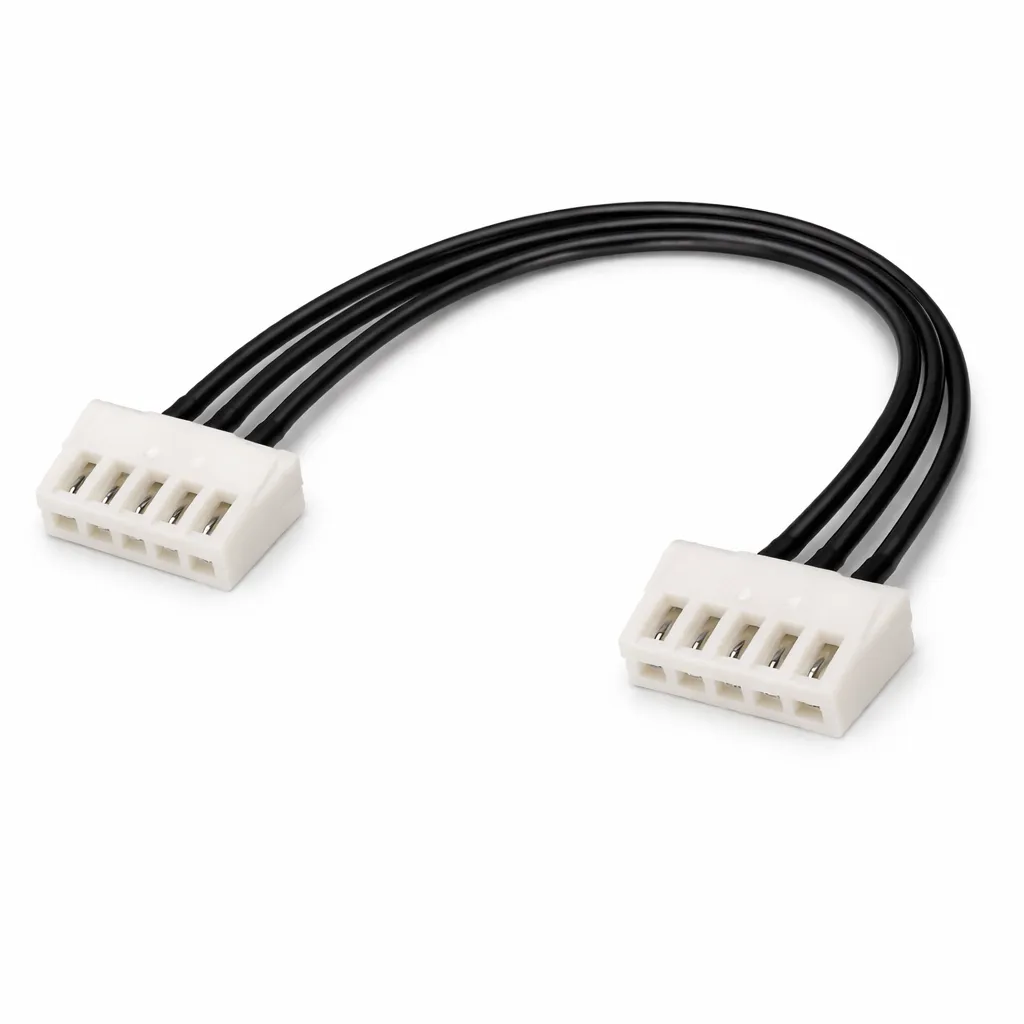
Darksoft CPS2 Key Writing Cable
Darksoft CPS2 Key Writing Cable for Champion Edition Kits The Darksoft CPS2 Key Writing Cable connects the J18 header on the Darksoft CPS2 Champion Edition Multigame Kit to the key-writing interface on a compatible original Capcom CPS2 B-board. This connection allows the Champion Edition kit to use compatible original, unmodified CPS2 game data. Without a key-writing connection, the installation is limited to compatible decrypted or patched game sets. View/Download CPS2 Champion Edition Install Guide (PDF) Compatibility Designed for the Darksoft CPS2 Champion Edition Multigame Kit. Connects to the J18 key-writing header on the Champion Edition main PCB. Supports direct connection to compatible CPS2 B-boards equipped with CN9. Older compatible B-board revisions without CN9 require soldered connections to CN2. This cable is not intended for unrelated CPS2 products or other Darksoft multigame platforms. CPS2 B-Boards with CN9 The following recommended CPS2 B-board revisions include the factory CN9 connector used for the direct key-writing cable connection: 93646B-5 93646B-6 93646B-7 97691A-3 Connect one end of the cable to the Champion Edition multigame board’s J18 header and the other end to the B-board’s CN9 connector. Both connectors have six positions, but only pins 2 through 5 are used for the key-writing connection. Older B-Boards Without CN9 Compatible revisions 93646B-3 and 93646B-4 do not include the CN9 connector. These boards require four wires to be soldered between the J18 cable connection and the B-board’s CN2 interface. Champion Edition J18 Pin CPS2 B-Board CN2 Pin Pin 5 A32 Pin 4 A30 Pin 3 A31 Pin 2 A29 Soldering Warning The CN2 installation should be performed only by someone experienced with precise arcade-PCB soldering. Incorrect connections, excessive heat, damaged pads, or shorted wires can damage the original B-board or multigame kit. Follow the current Champion Edition installation guide rather than relying on wire color. Wire colors may differ, but the connector-pin positions must remain correct. Installation Notes Disconnect all power before opening or handling the CPS2 board set. Discharge static before touching the B-board, multigame kit, or cable. Confirm the exact B-board revision before choosing the installation method. For CN9-equipped boards, align both connectors correctly before pressing them into place. For CN2 installations, tin the wires and complete the connections using the locations documented in the installation guide. Insulate soldered connections to prevent shorts. Route the cable so it cannot be pinched or pulled during board-shell reassembly. What Is Included One Darksoft CPS2 Champion Edition key-writing cable Important Notes This accessory does not function independently. A Darksoft CPS2 Champion Edition Multigame Kit is required. Key writing is used with compatible original, unmodified CPS2 game data. Compatible decrypted or patched game sets can be used without the key-writing connection. Confirm your B-board revision and installation method before ordering. Only use game data that you are legally entitled to possess and operate. Visit the Darksoft CPS2 Accessories category for related installation accessories.