
ARpiCADE 3–4 Player Raspberry Pi JAMMA Adapter


$225.00
Product information "ARpiCADE 3–4 Player Raspberry Pi JAMMA Adapter"
ARpiCADE 3–4 Player Raspberry Pi JAMMA Adapter
Bring compatible three- and four-player arcade games to your JAMMA cabinet with the ARpiCADE 3–4 Player Raspberry Pi JAMMA Adapter. This system combines the full-size ARpiCADE JAMMA interface with multiplayer expansion hardware, connecting a compatible Raspberry Pi to your cabinet's controls, power supply, audio, and display. Player 1 and Player 2 use the standard JAMMA harness, while Player 3 and Player 4 connect through dedicated multiplayer headers and compatible control harnesses. HighScoreSaves is the official United States distributor for ARpiCADE.
|
3–4 Player Support Multiplayer expansion included |
JAMMA Connection Uses compatible cabinet wiring |
|
Extra Controls P3/P4 and optional six-button |
Display Options Arcade CRT and modern displays |
Before You Order — Compatibility
| Cabinet interface | Compatible JAMMA arcade cabinet or properly configured Super Gun |
|---|---|
| Raspberry Pi | Raspberry Pi 3B or 3B+ for HighScoreSaves-provided multiplayer software images; Raspberry Pi not included unless selected as a product option |
| Player 1 and 2 | Joystick, start, coin, and up to three standard action-button inputs through the JAMMA harness |
| Player 3 and 4 | Dedicated multiplayer headers; compatible control harnesses required based on the cabinet and selected software image |
| Extra buttons | Optional six-button harness for Player 1 and Player 2 buttons 4, 5, and 6; correct DIP-switch configuration required |
| Original arcade monitor | Compatible low-resolution RGBS arcade CRT with the correct monitor output configuration |
| Modern display | Supported VGA or modern-display arrangements using the correct hardware and software configuration |
| Audio | Amplified mono through compatible JAMMA wiring or line-level stereo for a suitable external audio system |
| Power | Properly regulated arcade cabinet supply with correct JAMMA wiring and connector orientation |
| SD card / software | Compatible SD card and supported three- or four-player ARpiCADE software image; prepared image included only when selected |
Choose Your ARpiCADE Configuration
Monitor Type
Choose the monitor configuration matching your arcade cabinet. Compatible original low-resolution CRT displays require the proper RGBS output, while supported modern displays require the appropriate VGA or other compatible display arrangement and software settings.
ARpiCADE Multiplayer SD Card Image
Available configurations may include the 18-game Konami-style collection, 80-game three- and four-player collection, or 80 multiplayer games plus a 4,983-game arcade and console collection. Review all three searchable game-list PDFs below before selecting your image. HighScoreSaves-provided images are intended for Raspberry Pi 3B and 3B+ unless otherwise stated.
Optional Raspberry Pi 3
Select the available Raspberry Pi 3 option if you want one supplied with your ARpiCADE system. The base 3–4 Player adapter does not automatically include a Raspberry Pi. Confirm the selected software image is compatible with your Raspberry Pi model before ordering.
What's Included
ARpiCADE 3–4 Player system components:
- 1 × full-size ARpiCADE Raspberry Pi JAMMA adapter system
- Multiplayer expansion hardware for compatible three- and four-player configurations
- Selected monitor output configuration
- Selected SD card image, only when purchased as a product option
- Selected Raspberry Pi, only when purchased as a product option
Important: The multiplayer expansion hardware is already part of this product. Do not purchase the separate ARpiCADE 4-Player Add-On Adapter again for this complete 3–4 Player system.
Optional ARpiCADE Multiplayer Accessories
The following accessories may help complete a compatible multiplayer cabinet installation. Confirm your existing control-panel wiring and selected product options before ordering. Accessory images and names open their individual product pages; they do not change your ARpiCADE system selections.
 Konami 4-Player Kick Harness For compatible Konami-style 15-pin multiplayer connections. Verify the pinout, connector type, and number of harnesses required. |
 6-Pin Arcade Button Harness Connects additional Player 1 and Player 2 action buttons 4, 5, and 6 on compatible ARpiCADE hardware. |
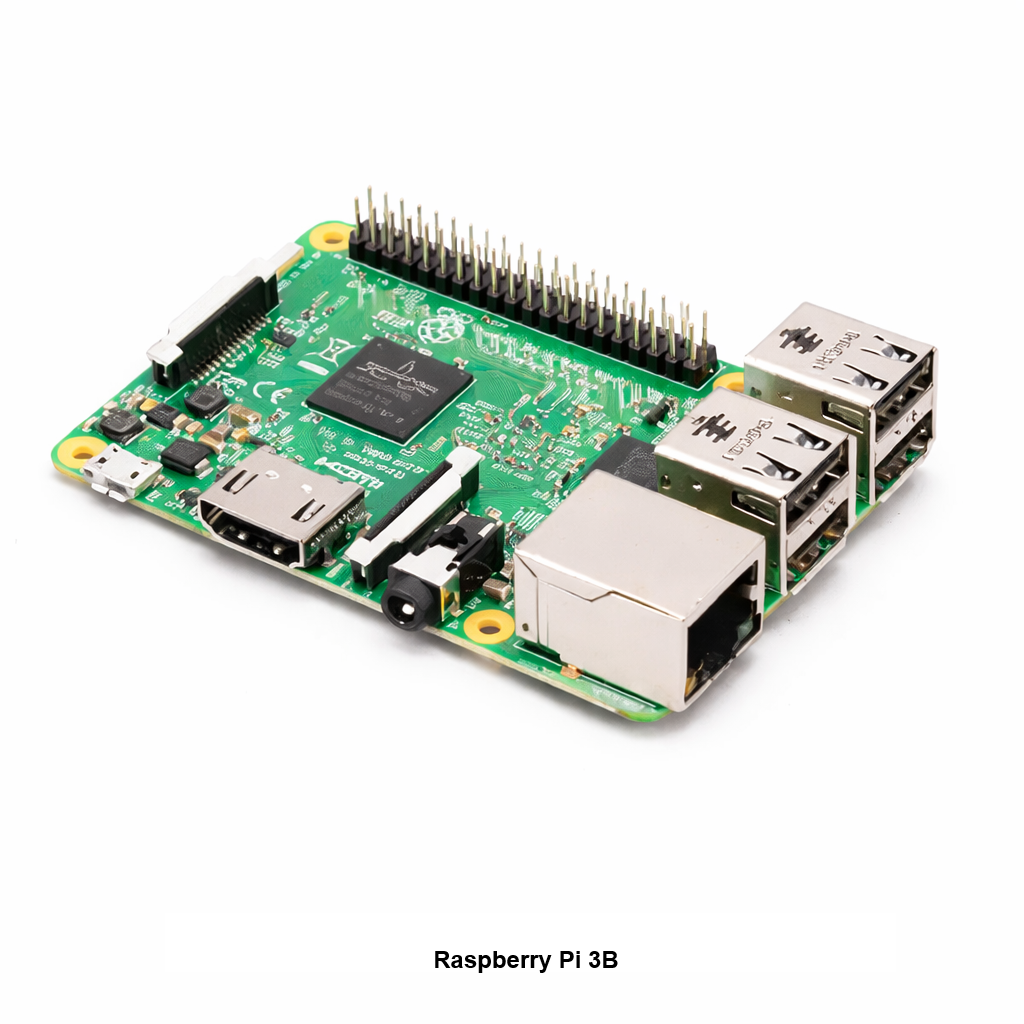 Raspberry Pi Model 3B For compatible Pi 3 ARpiCADE multiplayer images. Check whether your chosen system options already include a Raspberry Pi. |
 PCB Feet Mounting Kit General-purpose mounting hardware. Confirm mounting-hole fit and board clearance in your arcade cabinet. |
Multiplayer harness compatibility: Konami-style control connectors are not universal. Match the correct connector, pinout, player wiring, and harness quantity to your cabinet and selected software image. Browse ARpiCADE Accessories for additional compatible hardware.
Installation & Helpful Guides
Before installation, inspect the cabinet's JAMMA wiring, power supply, controls, audio connections, and monitor configuration. Connect the included multiplayer expansion hardware and Raspberry Pi ribbon cable with the system powered off, taking special care with the 40-pin connector alignment. Refer to the official four-player add-on manual for the expansion board's connector layout and installation procedure.
|
Compare ARpiCADE JAMMA & Multiplayer Systems
Review standard ARpiCADE, Mini, three- and four-player configurations, display options, and compatible accessories. |
|
View ARpiCADE Four-Player Add-On Installation Manual PDF
Official RaspberryJAMMA expansion board manual covering the required connectors, pin alignment, and multiplayer installation. |
|
Official ARpiCADE Software & Technical Support
Software releases, Raspberry Pi configuration, monitor setup, multiplayer control mapping, and community troubleshooting. |
Additional Technical Details
Open any section for detailed information about installation, Player 3 and Player 4 wiring, monitor selection, Raspberry Pi software, and troubleshooting.
JAMMA Installation, Multiplayer PCB & 40-Pin Alignment
JAMMA cabinet installation: The main ARpiCADE adapter connects to a compatible JAMMA arcade cabinet harness. It uses the cabinet's existing properly regulated power supply and standard JAMMA connections for Player 1 and Player 2 controls, audio, and supported display signals.
1. Disconnect all power: Turn off and disconnect the arcade cabinet or compatible Super Gun before installing or removing any adapter, expansion board, ribbon cable, or Raspberry Pi connection.
2. Inspect cabinet wiring: Confirm the JAMMA connector is correctly wired and in good condition. Verify the power supply, grounds, audio, controls, and intended monitor connection before installing the ARpiCADE.
3. Install the main ARpiCADE adapter: Connect the full-size adapter to the appropriate JAMMA harness using the correct connector orientation. Never force a JAMMA edge connector or connect hardware to an unknown wiring configuration.
4. Fit the multiplayer expansion PCB: The supplied expansion hardware connects to the appropriate ARpiCADE interface. Carefully align the PCB with all required headers and confirm the connector pins are straight and properly positioned.
5. Check the 40-pin headers: Both the expansion board and Raspberry Pi ribbon connection require correct alignment. An offset by even one pin or a reversed connection can damage the adapter, expansion PCB, or Raspberry Pi.
6. Connect the Raspberry Pi ribbon cable: Follow the connector orientation shown in the official four-player manual. Do not assume that the cable can be reversed or shifted on the header.
7. Check the expansion board before power-on: Inspect the entire 40-pin connection, ribbon cable seating, adapter clearance, and main JAMMA connection before reconnecting power.
Critical warning: Never power the system with an offset, reversed, or partially seated 40-pin connection. If the connector arrangement is uncertain, review the official four-player installation manual before proceeding.
Player 3 & 4 Wiring, Konami Harnesses & Extra Buttons
Players 1 and 2: Standard JAMMA wiring carries joystick directions, start, coin, and up to three normal action-button inputs for both players.
Players 3 and 4: The included multiplayer expansion provides dedicated connection points for Player 3 and Player 4 joystick directions, start, coin, and action-button inputs.
Required control harnesses: Player 3 and Player 4 controls connect using compatible multiplayer harnesses. The exact harness design, connector pinout, and number of harnesses depend on the original cabinet, control panel, and selected game-list image.
Konami-style multiplayer cabinets: Dedicated Konami-style three- and four-player game configurations may use separate auxiliary harness connections for the additional players. Some installations require two compatible harnesses.
Konami 15-pin harness: The separately available Konami 4-Player Kick Harness is intended for matching Konami-style 15-pin connections. Confirm the cabinet's exact connector, wiring layout, and pinout before ordering or connecting a harness.
Six-button Player 1 and Player 2 support: Games that use buttons 4, 5, and 6 require the appropriate optional extra-button harness, correct DIP-switch configuration, and compatible cabinet controls.
DIP-switch settings: Follow the documented configuration for standard JAMMA or expanded six-button operation. Incorrect settings may cause some controls to be unavailable or behave unexpectedly.
Cabinet modification: The adapter and harnesses provide electrical connections; they do not physically add joysticks or pushbuttons. Additional controls may require drilling or modifying the existing control panel.
Expansion already included: This complete 3–4 Player ARpiCADE system already includes its multiplayer expansion PCB. Do not buy a second expansion adapter when only the necessary cabinet control harnesses are required.
Original Arcade Monitors, VGA Displays & Audio
Original arcade CRT monitors: The full-size ARpiCADE multiplayer adapter supports compatible low-resolution RGBS video configurations for traditional arcade displays when the correct hardware and software settings are selected.
Monitor Type dropdown: Select the monitor configuration appropriate for your cabinet. Verify the intended resolution and signal type before connecting the ARpiCADE or applying power.
VGA configurations: Supported higher-resolution setups can use an appropriate VGA arrangement with a compatible monitor and correctly configured ARpiCADE software.
Modern LCD or LED displays: Selected modern-display configurations are supported when the correct hardware connections, display output, and software settings are used.
Critical video warning: Do not send an incompatible video resolution or signal to an original arcade CRT monitor. A monitor configuration intended for a modern display is not automatically suitable for a traditional low-resolution arcade monitor.
Amplified JAMMA mono audio: The adapter supports amplified mono audio through a correctly wired compatible JAMMA cabinet speaker connection.
Line-level stereo audio: Stereo output is available for installations using a suitable external amplifier or powered stereo audio system.
Audio wiring: Verify the cabinet's actual audio connection before use. Do not confuse amplified speaker outputs with line-level stereo outputs or connect incompatible audio equipment.
Raspberry Pi, Multiplayer SD Card Images & Software
Supported HighScoreSaves software hardware: HighScoreSaves-provided multiplayer SD card images for this system are intended for Raspberry Pi 3B and 3B+ unless otherwise stated.
Raspberry Pi inclusion: The base ARpiCADE 3–4 Player system does not automatically include a Raspberry Pi. Use the available Raspberry Pi 3 product option if you want a supported unit supplied with your system.
SD card requirement: Use a compatible SD card with a supported ARpiCADE system image. A prepared SD card image is included only when selected as part of the product configuration.
18-game Konami-style configuration: A focused group of 18 compatible three- and four-player Konami-style arcade games, intended for supported multiplayer cabinet arrangements and control wiring.
80-game multiplayer configuration: An expanded collection of 80 three- and four-player arcade games. Verify the cabinet's player controls, harness connections, and intended game list.
80 multiplayer plus 4,983 additional games: This larger configuration combines the 80-game multiplayer collection with a separate 4,983-game horizontal arcade and console library.
Choose the correct image: Consider the intended monitor orientation, number of players, control-panel button layout, Raspberry Pi model, and the cabinet's multiplayer wiring.
Additional software configurations: Other Raspberry Pi models may require a different supported ARpiCADE software image. Do not assume the HighScoreSaves Pi 3 multiplayer images will run on incompatible Raspberry Pi hardware.
Software customization: ARpiCADE is a Raspberry Pi-based platform that permits supported software, menu, display, and control customization. This system does not use original game PCBs in the same manner as an original-hardware multigame conversion.
Software support: Visit the official ARpiCADE support website for current software releases, documentation, and configuration assistance.
Frequently Asked Questions & Technical Support
Does this support three- and four-player games?
Yes. The included multiplayer expansion supports compatible three- and four-player configurations with the correct software image, control harnesses, and cabinet controls.
How are Player 3 and Player 4 connected?
Through the dedicated multiplayer expansion headers using compatible Player 3 and Player 4 control harnesses. The exact harness configuration depends on the cabinet and selected game setup.
Do I need to purchase the separate four-player expansion board?
No. This complete ARpiCADE 3–4 Player product already includes the multiplayer expansion hardware. Only purchase additional compatible harnesses, mounting hardware, or other components as needed.
Is a Raspberry Pi included?
Only when a Raspberry Pi is specifically selected as a product option. The base system does not automatically include a Raspberry Pi.
Can I use an original CRT arcade monitor?
Yes, with a compatible RGBS arcade monitor, properly configured video output, and the correct monitor selection.
Can Player 1 and Player 2 use six buttons?
Yes. Buttons 4, 5, and 6 require a compatible optional extra-button harness, the correct DIP-switch settings, and properly installed cabinet controls.
Will I need to modify my control panel?
Possibly. Cabinets without the necessary Player 3, Player 4, or extra action buttons may require additional controls, wiring, or physical control-panel modifications.
What if the system does not boot or recognize the multiplayer expansion?
Disconnect power and verify the 40-pin expansion board and Raspberry Pi ribbon cable are correctly aligned. Check the original JAMMA wiring, power supply, compatible Pi model, software image, and control-harness connections before troubleshooting further.
Where can I find the installation manual?
Review the RaspberryJAMMA Four-Player Add-On Manual PDF before connecting the expansion board or Raspberry Pi.
Where can I get ARpiCADE software and technical support?
Visit the official ARpiCADE support website for software documentation, installation information, and community troubleshooting.
For questions about a HighScoreSaves order or selected configuration, contact sales@highscoresaves.com with your product details, Raspberry Pi model, monitor type, and relevant cabinet-wiring information.
ARpiCADE Multiplayer SD Card Image Game Lists
Review the available multiplayer game collections before selecting an optional prepared SD card image. These searchable PDF game lists identify the titles included in each corresponding HighScoreSaves configuration. Each PDF opens in a new browser tab. Software-image availability and hardware support may vary.
18-Game Konami-Style 3- and 4-Player Image
A focused collection of 18 Konami-style multiplayer arcade games for compatible three- and four-player cabinet arrangements.
View 18-Game List PDF80-Game 3- and 4-Player Image
A larger collection of 80 three- and four-player arcade games for compatible multiplayer cabinets.
View 80-Game List PDF80 Multiplayer Games + 4,983 Arcade & Console Games
The 80-game multiplayer collection together with a larger 4,983-game horizontal arcade and console library.
View Complete Game List PDFShipping Information
Order preparation: Preparation time typically 1–3 business days. Confirm current availability and any additional processing details near Add to Cart.
Shipping: Available services and charges depend on the destination and selected product configuration. Review the shipping options and costs shown during checkout.
Returns and policies: Review the HighScoreSaves Shipping & Returns Policies for applicable shipping, returns, and order information.
Helpful ARpiCADE Resources
Compare ARpiCADE Raspberry Pi JAMMA Systems
ARpiCADE Multiplayer Accessories & Harnesses
RaspberryJAMMA Four-Player Installation Manual PDF
Stay in the Game
Get ARpiCADE updates, multiplayer arcade hardware tips, new accessories, restock announcements, and occasional subscriber-only offers.
Join the NewsletterHighScoreSaves Newsletter
Login